? Executive Sales & Customer Intelligence Suite (Power BI)
تفاصيل العمل
? Project Overview
This project delivers a comprehensive 3-page business intelligence solution designed to transform raw transactional data into actionable executive insights. By building a robust semantic layer using DAX (Data Analysis Expressions), this dashboard tracks performance across three critical business dimensions: Sales, Customers, and Products.
? The "Data Source" Connection
This project is part of a modular data architecture. It consumes data from a structured SQL Data Warehouse (Gold Layer).
Source: SQL Server (Import Mode)
Pre-processing: While basic cleaning was done in SQL, the advanced business logic and interactivity were engineered directly in Power BI using DAX.
SQL Backend Repository: (https://github.com/baheyt...)
?️ Data Modeling (Star Schema)
The foundation of this analysis is a highly optimized Star Schema, ensuring scalability and calculation accuracy.
Fact Table: fact_sales (Sales transactions and quantities).
Dimension Tables: * dim_customers: Demographic and segmentation data.
dim_products: Product catalog and performance tiering.
dim_date: A custom-built time dimension.
? Custom Date Dimension (DAX)
To support advanced Time Intelligence, I generated a dedicated date table:
dim_date = CALENDAR(MIN('gold_fact_sales'[order_date]), MAX('gold_fact_sales'[order_date]))
Quarter = YEAR(dim_date[Date]) & " Q" & QUARTER(dim_date[Date])
? Advanced DAX Engineering
To handle complex business logic directly within the data model, I engineered a series of calculated columns and measures:
1. Sales & Financial Logic
COGS (Cost of Goods Sold):
COGS = RELATED('gold_dim_products'[product_cost]) * 'gold_fact_sales'[quantity]
Total Profit:
total_profit = SUM('gold_fact_sales'[sales_amount]) - SUM('gold_fact_sales'[COGS])
Net Profit Margin:
net_profit = [total_profit] / SUM('gold_fact_sales'[sales_amount])
12-Month Moving Average =
AVERAGEX(
DATESINPERIOD(dim_date[Date], LASTDATE(dim_date[Date]), -12, MONTH),
SUM('gold fact_sales'[sales_amount])
)
Customer Intelligence & Segmentation Dynamic Age Binning: (Calculated relative to the last order date in the dataset)
age_bins =
VAR age = DATEDIFF('gold dim_customers'[birth_date], MAX('gold fact_sales'[order_date]), YEAR)
RETURN
SWITCH(TRUE,
age < 30 , "18-29",
age < 40 , "30-39",
age < 50 , "40-49",
age < 60 , "50-59",
age >= 60 , "60 & Above"
)
Customer Lifespan: lifespan = DATEDIFF(MIN_ORDER_DATE, MAX_ORDER_DATE, MONTH)
Product Performance Tiering Product Segment: Automatically tiers the catalog into High, Mid, and Low performers based on revenue.
product_segment =
VAR total_sales = CALCULATE(SUM('gold fact_sales'[sales_amount]), ALLEXCEPT('gold dim_products','gold dim_products'[product_key]))
RETURN
SWITCH(TRUE(),
total_sales > 50000, "Top-performer",
total_sales > 10000, "Mid-Level",
"Low Performer")
? Key Analytical Insights
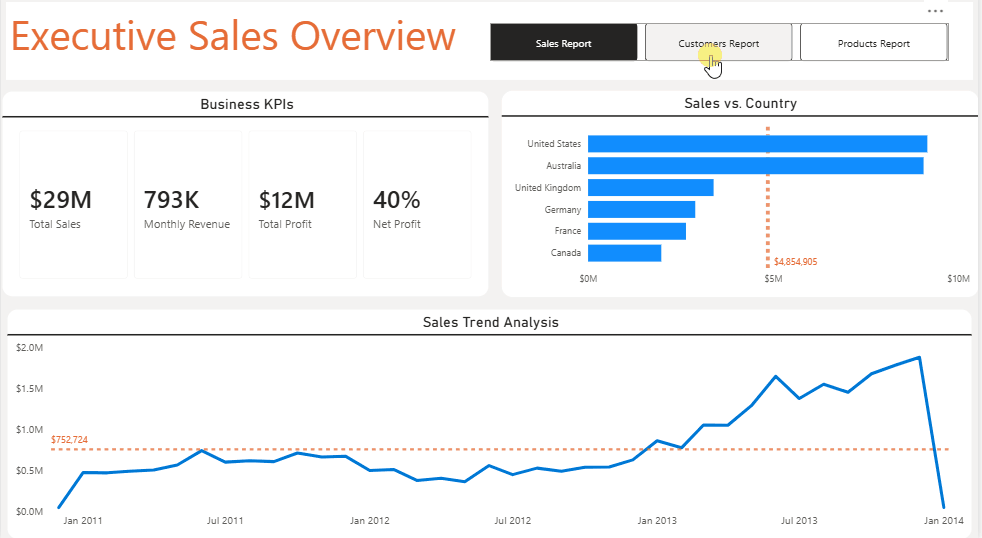
? Executive Sales Overview Revenue Health: Generated $29M in total revenue with a steady 40% Net Profit Margin. Global Footprint: The United States market leads as the primary revenue engine, followed by Australia.
? Customer Demographics Target Audience: Customers aged 30-49 are the most significant contributors, representing approximately 68% of total revenue. Retention Patterns: Engagement analysis shows a peak retention window within the first 24 months of a customer’s lifecycle.
? Product Performance Revenue Mix: The Road Bikes subcategory is the dominant revenue driver ($14.51M), accounting for over 51% of total sales. Cost vs. Profit: High-cost bike models drive the highest absolute profit, while accessories serve as volume-based foot-traffic drivers.
?️ Tools & Technologies
Power BI Desktop: UI/UX Design, Data Visualization, and Modeling.
DAX: Advanced analytical measures and calculated columns.
SQL Server: Source data hosting (Gold Layer).
GitHub: Version control and project documentation.