Keyword Search in Files - Using Python
تفاصيل العمل
الوصف العام للمشروع :
اسم البرنامج: أداة البحث الذكية داخل الملفات (Word - PDF - Excel - PowerPoint)
هدف البرنامج: تمكين المستخدم من البحث عن أي كلمة داخل مجموعة ملفات مختلفة وعرض كافة التفاصيل المتعلقة بها بسهولة.
مميزات البرنامج:
- يدعم ملفات: Word، PDF، Excel، PowerPoint.
- لا يهتم بحالة الأحرف (بحث غير حساس لكلمة "Data" أو "data").
- يعرض الملف الذي يحتوي على الكلمة.
- يعرض السطر أو الفقرة التي وردت فيها الكلمة.
- واجهة استخدام بسيطة وسهلة.
- يمكن تشغيله بدون الحاجة لأي أدوات برمجة (جاهز للتنفيذ).
️ سيناريو التشغيل :
- يقوم المستخدم بفتح البرنامج (بعد فك الضغط إن وُجد).
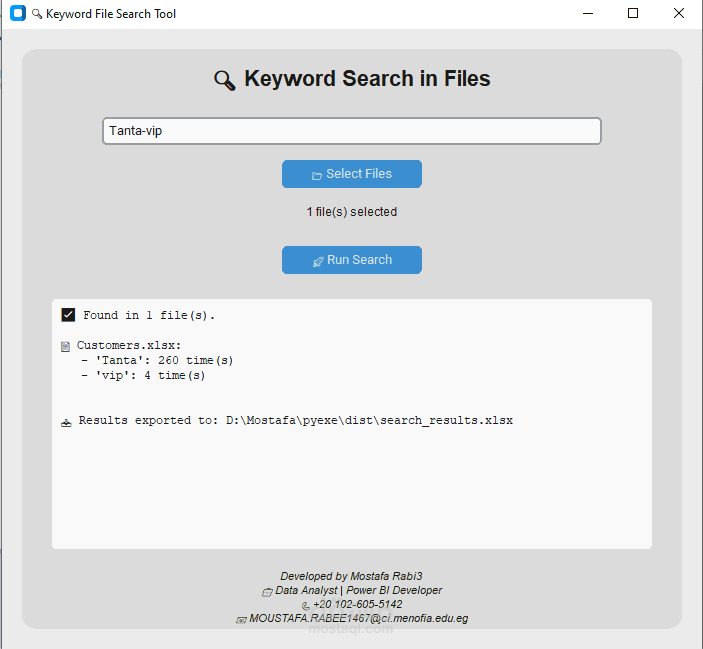
- تظهر له واجهة فيها:
زر لاختيار مجلد الملفات.
مربع لإدخال الكلمة المطلوب البحث عنها.
زر لبدء عملية البحث.
عند الضغط على "بحث":
- يقوم البرنامج بمسح كل الملفات في المجلد.
- يبحث داخل كل ملف عن الكلمة المحددة.
يعرض النتائج في جدول:
اسم الملف
نوع الملف
الجملة أو المحتوى الذي ظهر فيه البحث
- يمكن للمستخدم نسخ أو تصدير النتائج حسب الحاجة.
---------------------------------------------------------------------------------------------------------------------------------------------------
Project Name: Smart Keyword File Search Tool
Purpose: To help users find any keyword inside multiple files (Word, PDF, Excel, PowerPoint) and display full context.
Key Features:
Supports Word, PDF, Excel, PowerPoint files.
Case-insensitive search ("Data" = "data").
Shows the exact sentence or content where the word appears.
Displays file name and type.
Clean and user-friendly interface.
No coding knowledge required to use.
️ How to Use :
Open the program (after extracting the zip file if needed).
Interface provides:
A button to select the folder of files.
A text field to enter the keyword to search.
A “Search” button to start scanning.
When “Search” is clicked:
The program scans all supported files inside the folder.
It searches for the keyword inside each file (case-insensitive).
Displays results:
File name
File type
Sentence or paragraph containing the keyword.
User can read, copy, or save the results if desired.