Solving BGInfo Deployment Challenges in Active Directory Environments
تفاصيل العمل
حل تحديات نشر BGInfo في بيئات Active Directory
منذ ثلاث سنوات، واجهت مشكلة تقليدية سيعرفها العديد من مديري النظام: نشر BGInfo عبر النطاق لعرض معلومات النظام الحية على أجهزة الكمبيوتر المكتبية. كنت بحاجة أيضًا إلى تسمية الأجهزة بواسطة الاسم باستخدام أيقونة سطح المكتب "This PC" لتسهيل الدعم وتعقب الأصول.
التحدي:
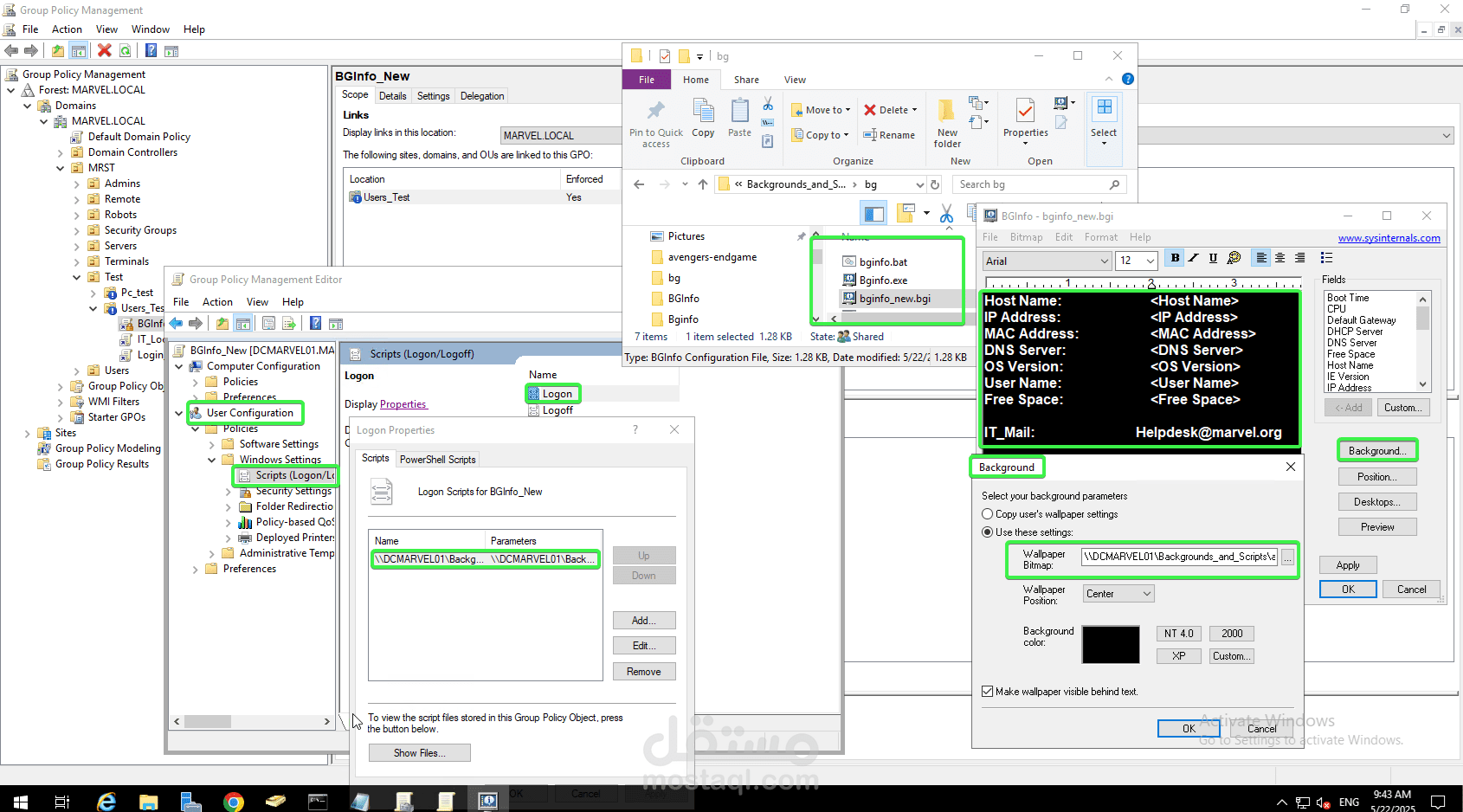
في البداية، قررت استخدام نشر عبر Group Policy Object (GPO). بدا الأمر منطقيًا على الورق: تم دفع BGInfo.exe وملفات .bgi من مشاركة الشبكة إلى كل جهاز. ولكن النتائج في الواقع؟ لم تكن نظيفة:
فشل نسخ ملف GPO مع رمز الخطأ 0x80070005 (تم رفض الوصول) على الرغم من أن الأذونات كانت تبدو صحيحة.
تم تجاوز إعدادات خلفية BGInfo بواسطة GPO آخر يتحكم في خلفيات سطح المكتب.
ما الذي نجح بدلاً من ذلك:
انتقلت إلى برنامج نصي لتسجيل الدخول يتم نشره عبر GPO ولكن يتم تنفيذه تحت سياق المستخدم. هذا حل مشكلة الأذونات تمامًا وتجنب مشكلة الوصول إلى الملفات في سياق النظام.
إليك البرنامج النصي الذي يعمل:
mkdir "C:\Bginfo" 2>nul
xcopy "\\server\bg\Bginfo.exe" "C:\Bginfo\" /Y
xcopy "\\server\bg\bginfo_new.bgi" "C:\Bginfo\" /Y
C:\Bginfo\Bginfo.exe C:\Bginfo\bginfo_new.bgi /SILENT /TIMER=0 /NOLICPROMPT
reg add HKCU\Software\Microsoft\Windows\CurrentVersion\Explorer\HideDesktopIcons\NewStartPanel /v {20D04FE0-3AEA-1069-A2D8-08002B30309D} /t REG_DWORD /d 0 /f
reg add HKCU\Software\Microsoft\Windows\CurrentVersion\Explorer\CLSID\{20D04FE0-3AEA-1069-A2D8-08002B30309D} /ve /d %computername% /t REG_SZ /f
ما الذي يفعله هذا البرنامج النصي:
ينشئ مجلد C:\Bginfo (إذا لم يكن موجودًا بالفعل).
ينسخ الملف التنفيذي وملف التكوين من المشاركة.
يشغل BGInfo بصمت دون أي مطالبات من المستخدم.
يجبر أيقونة "This PC" على الظهور على سطح المكتب.
يعيد تسمية الأيقونة لتعرض اسم الكمبيوتر الحالي.
النتيجة:
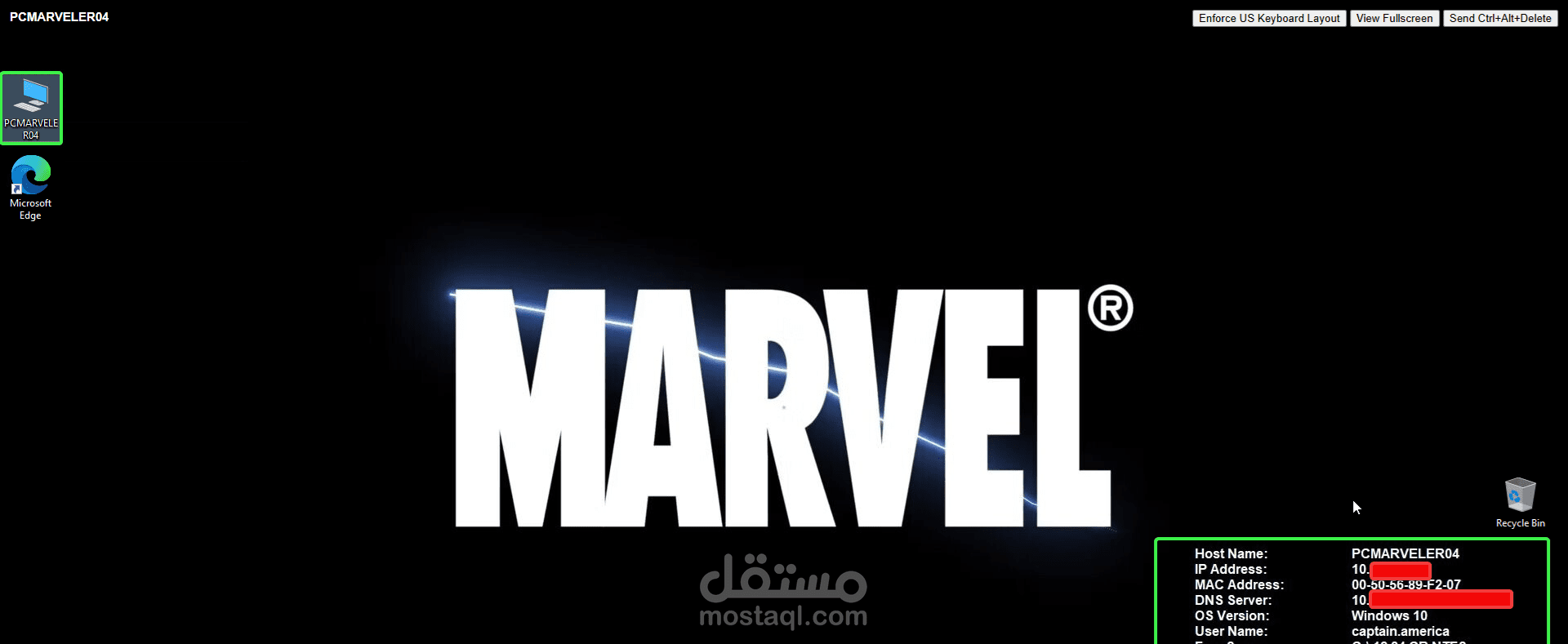
الآن يتم تحميل BGInfo بشكل موثوق على جميع أجهزة سطح المكتب الخاصة بالمستخدمين.
يمكن للمستخدمين وفريق الدعم رؤية تفاصيل الأصول على الفور.
الآن، تعمل أيقونات سطح المكتب كمعرفات، وهو أمر مفيد في البيئات المختلطة مثل المختبرات أو الأكشاك.
الخاتمة:
أشارك هذا الحل في حال واجه شخص آخر نفس المشكلة التي واجهتها. كان هذا أحد الحلول المستخدمة في بيئة TRT World. إذا كنت قد قمت ببناء أو نشر إعدادات مشابهة لـ BGInfo، شارك طريقتك أدناه. دائمًا ما أكون فضولياً لمعرفة كيف يحل الآخرون هذه المشاكل
------------------------------------------------------------------------------------
Solving BGInfo Deployment Challenges in Active Directory Environments
Three years ago, I ran into a classic issue many SysAdmins will recognize: deploying BGInfo across a domain to show live system info on desktops. I also needed to label machines by name using the "This PC" desktop icon for easier support and asset tracking.
The Challenge:
I initially went with a Group Policy Object (GPO) file deployment. Made sense on paper, pushed BGInfo.exe and .bgi configs from a network share to each machine. But the real-world results? Not so clean:
- GPO file copy failed with 0x80070005 (Access Denied) despite correct-looking permissions.
- BGInfo wallpaper settings kept getting overridden by another GPO controlling desktop backgrounds.
What Worked instead:
I switched to a logon script deployed via GPO, but executing under the user’s context. That sidestepped the permission issue entirely and avoided the system context problem with file access.
Here’s the working script:
mkdir "C:\Bginfo" 2>nul
xcopy "\\server\bg\Bginfo.exe" "C:\Bginfo\" /Y
xcopy "\\server\bg\bginfo_new.bgi" "C:\Bginfo\" /Y
C:\Bginfo\Bginfo.exe C:\Bginfo\bginfo_new.bgi /SILENT /TIMER=0 /NOLICPROMPT
reg add HKCU\Software\Microsoft\Windows\CurrentVersion\Explorer\HideDesktopIcons\NewStartPanel /v {20D04FE0-3AEA-1069-A2D8-08002B30309D} /t REG_DWORD /d 0 /f
reg add HKCU\Software\Microsoft\Windows\CurrentVersion\Explorer\CLSID\{20D04FE0-3AEA-1069-A2D8-08002B30309D} /ve /d %computername% /t REG_SZ /f
What This Does:
Creates the C:\Bginfo folder (if it doesn’t already exist)
Copies the executable and config from the share
Runs BGInfo silently with no user prompts
Forces "This PC" icon to appear on desktop
Renames the icon to show the current computer name
Outcome:
BGInfo now loads reliably on all user desktops.
Users and support staff can immediately see asset details.
Desktop icons now double as identifiers, which is a nice touch in mixed lab or kiosk environments.
I’m sharing this in case someone else hits the same wall I did. It was one of the implementations in TRT World environment. If you’ve built or deployed similar BGInfo setups, drop your approach below, always curious how others are solving this.
---------------------------------------------------------------------------------------------