web page
تفاصيل العمل
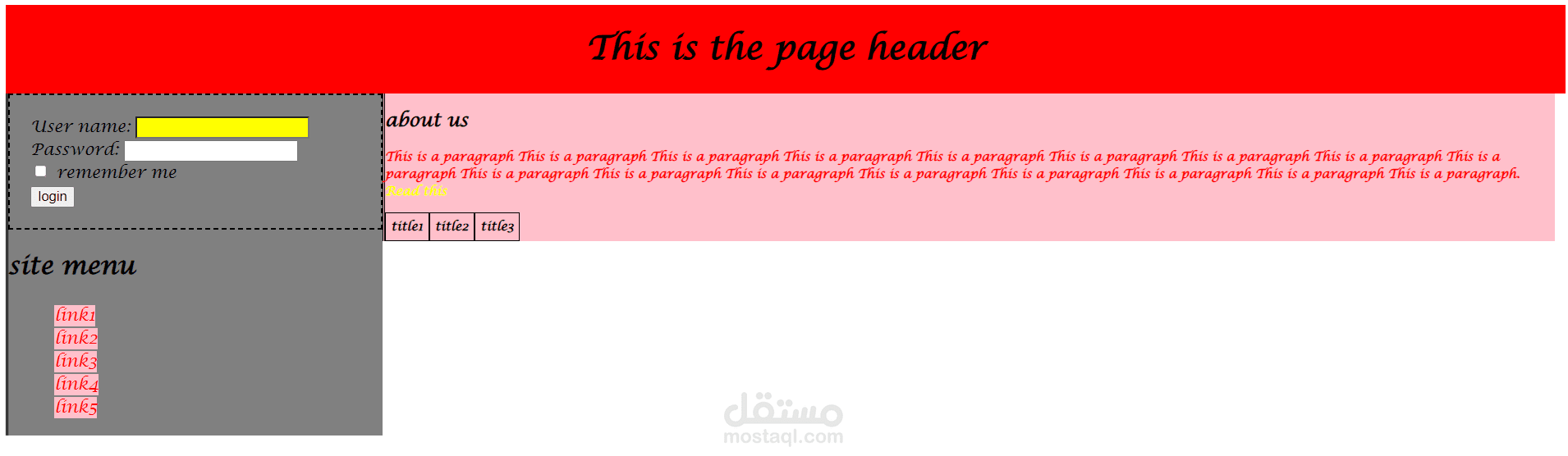
1-Make External CSS file for that:
a.Make the font type "Lucida Calligraphy" for any p or div or span tag (use one CSS rule).
b.<h1> tag which is child from div tag to be in the center of the page.
2-Make inline style for the div with "header" id, that make its width=100%, and its background color red.
3-Make inline style for the span which its id is "linksbar" , that make its width=25%, its background color gray, and make it starts from the left of the page (float property).
4-Make inline style for the span which its id is "content", that make its width=75%, its back color pink, and make it comes to the left side after the previous span (float property).
5-Make internal style that:
a.Make a class name "none-bullet-list" that can be applied on <ul> tags, and makes list style type of the <ul> without bullets (none), and apply this class on the <ul> tag that contains the links (apply it to the <ul> tag in html directly, the selector will be class name only).
b.Make color red, and background color pink for the links that're direct child for <li> tag, which inside span with id= "linksbar", and make it appear without underline (text-decoration property).
c.Make color pink, and background color red for the links that're direct child for <li> tag, which ( inside span with id= "linksbar", when mouse is over it.
d.Make the font weight bold, and font size 12px, for the paragraph that comes directly after (sibling) <h2> tag which is direct child for <span> with id="content".
e.Make a dashed border, with size 2, and color rgb(20,70,60), for the div with id " loginform".
f.Make style that makes the background color yellow of the any <input> of type "text", and another style that makes its background color white when it's focused.
g.Make a class named "tabled-bordered" that can be applied on any tag, and make it displayed as table cells (use display property), its padding 5, and make a border for it. Apply the class to the 3 <p> tags that are in the "titles" div (apply them on the p tags that are in "titles" div in html file, the selector will be class name only).
i.Try to change the <p> tags inside the div with id "titles" to spans, is there any difference?
h.Use ::after pseudo element, to add this text “Read this” with color yellow” after the paragraph that is nested from span.
6-Make 2 internal styles as the following (With the same order):
a.Color yellow for the <p> with id "aboutus" that's direct child from span with id "content".
b.Color red for the <p> with id "aboutus".
Which style will be applied to the paragraph? And why?
7-Use !important with the second style of the previous 2 styles. What's the change that happened and why?