YouTube Frontend
تفاصيل العمل
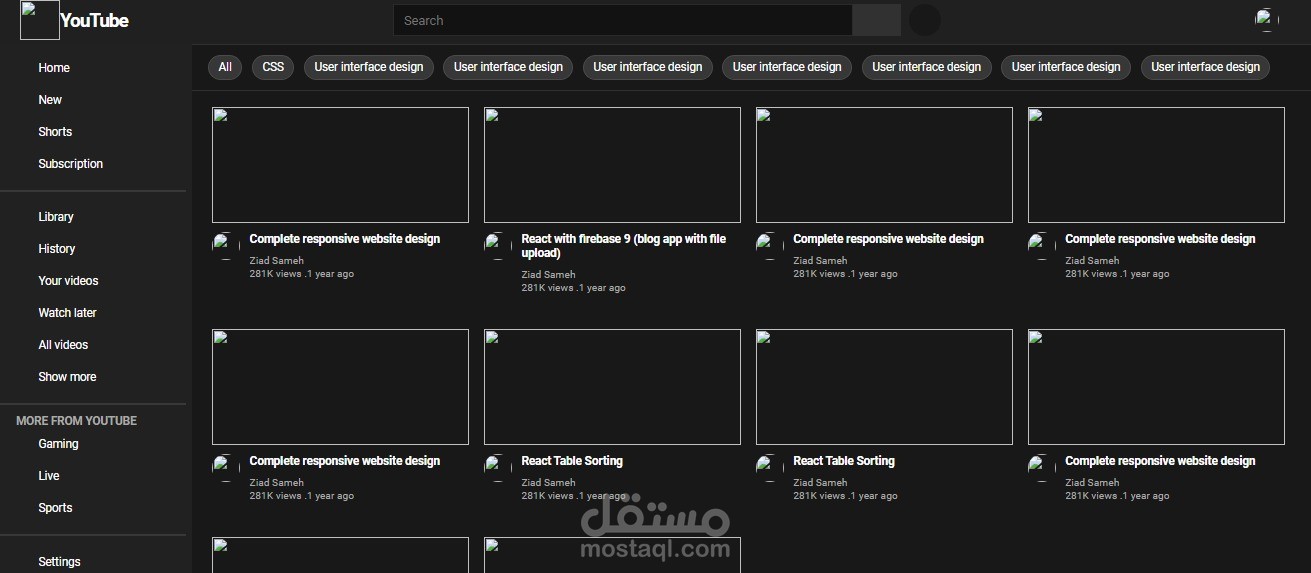
هذا المشروع هو صفحة ويب تحاكي واجهة مستخدم موقع YouTube. تحتوي الصفحة على عناصر HTML و CSS لتنظيم وتنسيق المحتوى.
في الجزء العلوي من الصفحة، يوجد شريط عنوان وشعار لـ YouTube. أسفل الشعار، يتواجد حقل البحث الذي يسمح للمستخدم بإدخال كلمة أو عبارة للبحث عن مقاطع الفيديو. يتواجد أيضًا زر البحث وزر التسجيل الصوتي للبحث بالصوت.
تحت حقل البحث، يوجد خط أفقي يفصل بين جزء البحث وبقية المحتوى.
في الجزء الأيسر من الصفحة، يوجد قائمة جانبية تحتوي على عدة روابط تنقل المستخدم إلى صفحات مختلفة مثل الصفحة الرئيسية، الفيديوهات الجديدة، الفيديوهات المختصرة، الاشتراكات، المكتبة، التاريخ، قائمة تشغيل الفيديوهات، والمزيد.
في الجزء الأيمن العلوي من الصفحة، يتواجد قسم لصورة الملف الشخصي وبعض الأيقونات مثل رمز الفيديو الجديد ورمز الشبكة ورمز الإشعارات.
في الجزء الأيمن السفلي من الصفحة، يوجد عناصر فيديو متعددة. يتم عرض صورة مصغرة للفيديو مع تفاصيل المحتوى مثل العنوان واسم القناة وعدد المشاهدات وتاريخ الرفع. يتواجد أيضًا بعض الأزرار للإجراءات مثل حفظ الفيديو للمشاهدة لاحقًا وإضافته إلى قائمة التشغيل.
الأنماط المحددة في CSS تعطي تنسيقًا للعناصر المختلفة على الصفحة مثل الألوان والحجم والخطوط. تم استخدام HTML و CSS لإنشاء صفحة يشبه واجهة YouTube ولتمكين المستخدمين من البحث عن مقاطع الفيديو ومشاهدتها.
This project is a web page that simulates the user interface of the YouTube website. The page contains HTML and CSS elements to organize and style the content.
At the top of the page, there is a header bar and the YouTube logo. Below the logo, there is a search field that allows users to enter keywords or phrases to search for videos. There are also search and voice search buttons for audio-based searching.
Below the search field, there is a horizontal line separating the search section from the rest of the content.
On the left side of the page, there is a sidebar menu that includes several links to navigate users to different pages such as the homepage, new videos, shorts, subscriptions, library, history, playlist, and more.
On the top right of the page, there is a section for the profile picture and icons such as the new video icon, network icon, and notifications icon.
In the bottom right of the page, there are multiple video elements. A thumbnail image of the video is displayed along with details such as the title, channel name, view count, and upload date. There are also buttons for actions such as saving the video for later viewing and adding it to the playlist.
The CSS styles applied give formatting to the different elements on the page such as colors, size, and fonts. HTML and CSS were used to create a page that resembles the YouTube interface and enables users to search for and watch videos.