Project Tendering Full Solution
تفاصيل العمل
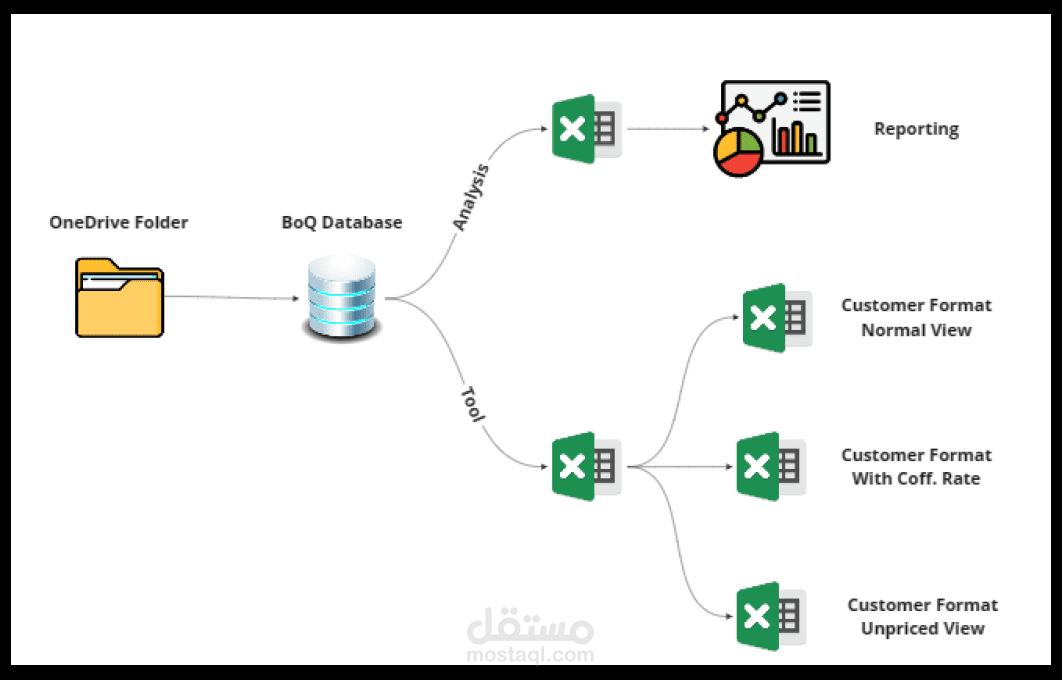
The solution is divided into two parts
Analysis Tool: This tool enables great comparisons and gives
Variances and deltas between different versions of the BoQs.
Comparisons based on currency exchange rates.
Comparisons between normal versions of the BoQs and those after adding Coff. Rates.
This tool can be used by all levels of the project, from the scope down to the smallest items, using the powerful capabilities of power query
and Excel power pivot.
Data Reform Tool: This tool can be used to reform data into a customer format with a clean copy of the data. With just one click, the tool:
Calculates the data from the database.
Extracts the data into the customer format after multiplying it by the Coff rates that have been entered by the tender manager.
Enables one-click extraction of the unpriced version of the BoQ from the database.
Enhances all the generated sheets to make them fit and ready to be printed directly.
These features allow for a streamlined and efficient tendering process, saving time and effort for the tender team.