Invoice Intake and AI Data Extraction
تفاصيل العمل
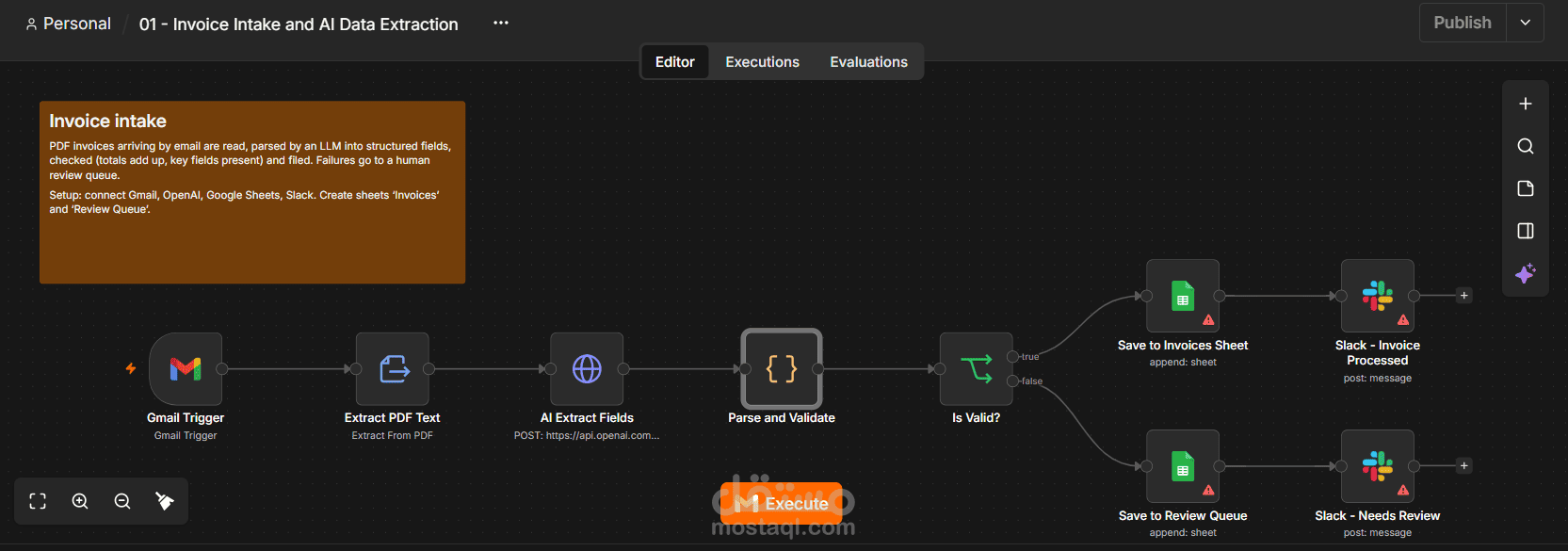
# Invoice Intake and AI Data Extraction
## The client problem
Accounts teams retype invoice details from PDFs into spreadsheets or ERPs. It is slow and error-prone.
## How it works
1. Gmail Trigger watches for unread emails with PDF invoices
2. Extract PDF Text pulls the raw text
3. AI Extract Fields (OpenAI) returns structured JSON
4. Parse and Validate checks required fields and that subtotal + tax = total
5. Valid invoices go to the Invoices sheet and a Slack confirmation; the rest go to a Review Queue sheet with the reasons
## Setup
- Credentials: Gmail OAuth2, OpenAI API, Google Sheets OAuth2, Slack
- Create a Google Sheet with tabs 'Invoices' and 'Review Queue' and paste its ID into both Sheets nodes
- Add header row matching the fields in the Parse and Validate node (vendor, invoice_number, ...)
- Choose your Slack channel in both Slack nodes
## Easy customizations (upsell ideas)
- Swap Sheets for QuickBooks, Xero, Odoo or a SQL insert
- Add an approval step (Slack buttons or email) above a spend threshold
- Handle scanned PDFs by adding an OCR step before the AI node
## Nodes used
Gmail Trigger, Extract PDF Text, AI Extract Fields, Parse and Validate, Is Valid?, Save to Invoices Sheet, Slack - Invoice Processed, Save to Review Queue, Slack - Needs Review
## Case study (fill in after a real client delivery)
- **Client / industry:**
- **Before:** (hours per week, error rate, delays)
- **After:** (measured result)
- **Delivery time and tools:**