Secure Document Vault
تفاصيل العمل
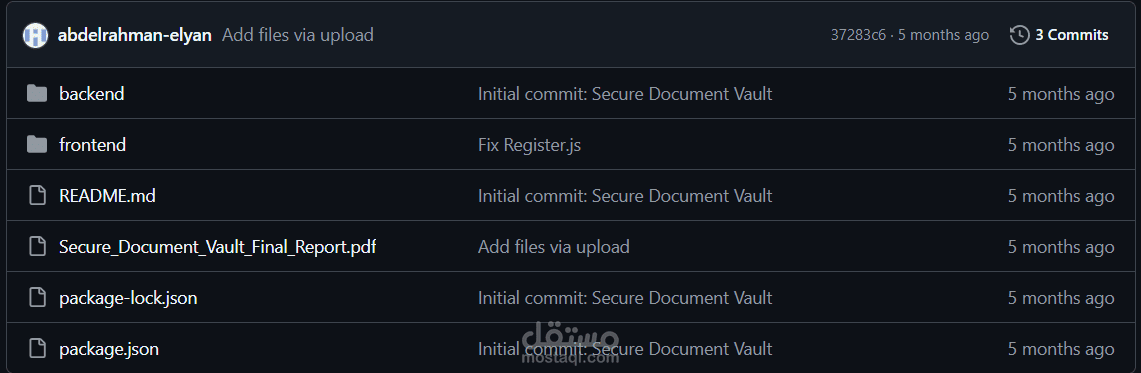
🔐 Secure Document Vault
A secure web-based platform for uploading, storing, encrypting, signing, and verifying digital documents. Built with Node.js, React, and MySQL.
🚀 Prerequisites
Make sure you have the following installed:
Node.js (v18+)
XAMPP (for MySQL)
Git
⚙️ Setup Instructions
1. Clone the repository
git clone https://github.com/YOUR_U...
cd secure-vault
2. Setup the Database
Open XAMPP → Start Apache and MySQL
Open phpMyAdmin
Click New → create database named secure_vault
Click Import → select backend/database.sql → click Go
Default admin account:
Email: admin@vault.com
Password: password
3. Configure Backend Environment
Edit backend/.env:
PORT=5000
DB_HOST=localhost
DB_USER=root
DB_PASSWORD=
DB_NAME=secure_vault
JWT_SECRET=your_super_secret_key_here
JWT_EXPIRES_IN=24h
ENCRYPTION_KEY=12345678901234567890123456789012
FRONTEND_URL=https://localhost:3000
OAUTH_CALLBACK_URL=https://localhost:5000
# GitHub OAuth (get from github.com/settings/devel...)
GITHUB_CLIENT_ID=your_github_client_id
GITHUB_CLIENT_SECRET=your_github_client_secret
# Google OAuth (get from console.cloud.google.com)
GOOGLE_CLIENT_ID=your_google_client_id
GOOGLE_CLIENT_SECRET=your_google_client_secret
4. Install Backend Dependencies
cd backend
npm install
5. Configure Frontend Environment
Edit frontend/.env:
REACT_APP_API_URL=https://localhost:5000/ap...
HTTPS=true
6. Install Frontend Dependencies
cd frontend
npm install
7. Run the Application
Open two terminals:
Terminal 1 – Backend:
cd backend
node server.js
Backend runs on: https://localhost:5000
Terminal 2 – Frontend:
cd frontend
npm start
Frontend runs on: https://localhost:3000
⚠️ Your browser will show a security warning for the self-signed SSL certificate. Click Advanced → Proceed to continue.
🔑 Default Accounts
Role Email Password
Admin admin@vault.com password
To create Manager/User accounts → Register, then Admin changes role from Admin Panel.
🛡️ Security Features
Feature Implementation
Password Hashing bcrypt (cost factor 10)
Authentication JWT (JSON Web Tokens)
OAuth GitHub & Google via Passport.js
2FA TOTP via speakeasy + QR Code
RBAC Admin / Manager / User roles
Encryption AES-256-CBC
Hashing SHA-256
Digital Signatures RSA-2048
Transport Security HTTPS (self-signed cert)
📁 Project Structure
secure-vault/
├── backend/
│ ├── certs/ # SSL certificates
│ ├── config/ # DB + Passport config
│ ├── middleware/ # JWT auth middleware
│ ├── routes/ # API routes
│ ├── utils/ # Encryption utilities
│ ├── uploads/ # Encrypted document storage
│ ├── database.sql # Database schema
│ └── server.js # HTTPS server entry point
├── frontend/
│ └── src/
│ ├── pages/ # React pages
│ ├── components/ # Navbar
│ ├── context/ # Auth context
│ └── api/ # Axios instance
└── README.md
📡 API Endpoints
Auth
Method Endpoint Description
POST /api/auth/register Register new user
POST /api/auth/login Login
POST /api/auth/2fa/verify-login Verify 2FA code
POST /api/auth/2fa/setup Generate 2FA QR
POST /api/auth/2fa/enable Enable 2FA
POST /api/auth/2fa/disable Disable 2FA
GET /api/auth/github GitHub OAuth
GET /api/auth/google Google OAuth
GET /api/auth/me Get current user
Documents
Method Endpoint Description
GET /api/documents List documents
POST /api/documents/upload Upload & encrypt
GET /api/documents/download/:id Download & decrypt
POST /api/documents/verify/:id Verify integrity
DELETE /api/documents/:id Delete document
Admin
Method Endpoint Description Role
GET /api/admin/users List all users Admin
PUT /api/admin/users/:id/role Update role Admin
DELETE /api/admin/users/:id Delete user Admin
GET /api/admin/stats System stats Admin/Manager
About
No description, website, or topics provided.
Resources
Readme
Activity
Stars
0 stars
Watchers
0 watching
Forks
0 forks
Releases
No releases published
Create a new release
Packages
No packages published
Publish your first package
Contributors
1
(1)
@abdelrahman-elyan
abdelrahman-elyan
Languages
JavaScript
99.3%
Other
0.7%
Suggested workflows
Based on your tech stack
Datadog Synthetics logo
Datadog Synthetics
Run Datadog Synthetic tests within your GitHub Actions workflow
By Datadog
Webpack logo
Webpack
Build a NodeJS project with npm and webpack.
By GitHub Actions
Publish Node.js Package logo
Publish Node.js Package
Publishes a Node.js package to npm.
By GitHub Actions
More workflows
Footer