attack-shark-ctl: High-Performance Linux Driver & Daemon in Rust
تفاصيل العمل
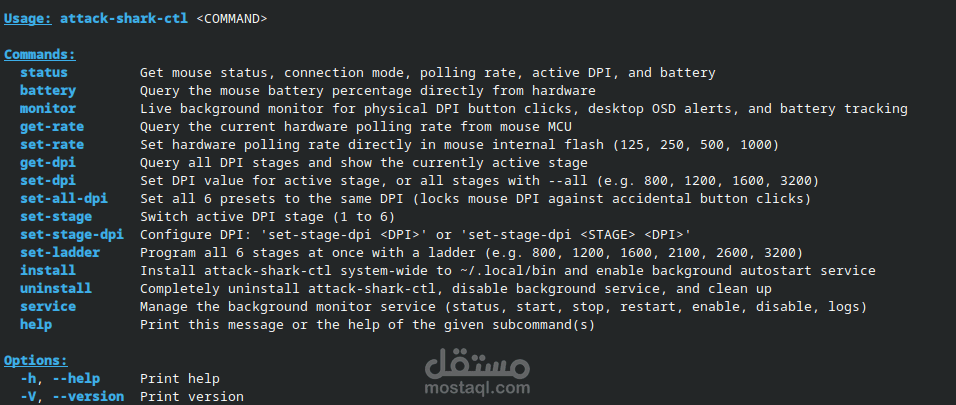
attack shark ctl: High-Performance Bare-Metal Linux Driver & Background Daemon for Gaming Mice
Overview
A native, lightweight Linux driver CLI and systemd background service engineered for the Attack Shark gaming mouse series. It brings complete 1:1 hardware control to Linux without relying on heavy Electron wrappers or Wine emulation.
The Challenge
Attack Shark produces high-grade competitive gaming mice featuring high-precision PixArt optical sensors and 1000 Hz wireless polling rates. However, the manufacturer only distributes proprietary Windows software (.exe). The objective was to create
a fast, robust, and native Linux utility with zero overhead, enabling Linux users to configure their hardware seamlessly.
Technical Implementation & Engineering:
- Clean Room Reverse Engineering: Sniffed and analyzed raw USB/HID packets to uncover the vendor's unified communication protocol across 18 distinct hardware profiles.
- Low-Level Kernel Communication: Built with pure Rust using direct `/dev/hidraw` kernel ioctls and non-blocking I/O (no heavy third-party runtime dependencies).
- Zero-Latency Wireless: Created automated udev rules that prevent Linux runtime USB autosuspend, eliminating wake-up lag and sleep stutters over 2.4G wireless.
- Resource Efficiency: The background daemon operates under 2.5 MB of RAM and maintains 0.0% CPU usage as an unprivileged user-level systemd service.
Key Features:
- Dual-Mode Hot-Swap: Automatically detects and switches between USB-C wired mode and 2.4G wireless dongle connections dynamically.
- Polling Rate Configuration: Instant switching across 125 Hz, 250 Hz, 500 Hz, and 1000 Hz.
- Granular Optical DPI Management: Full access to all 6 onboard DPI stages with hardware register math in exact 50-DPI steps.
- Live Physical Sync: On-the-fly synchronization between the daemon and physical mouse button clicks.
- Battery Monitoring: Live fuel-gauge percentage polling with charge/discharge state detection.
- Persistence & OSD: Retains custom profile settings across system reboots and triggers native desktop OSD notifications upon button presses.
Technologies & Tools:
- Languages: Rust (Low-level Systems Programming, libc, ioctls)
- Platform & APIs: Linux Kernel (HIDRAW API, Udev Rules, Systemd Daemons)
- Scripting & Version Control: Bash, Git, GitHub