Restaurant ai agent customer support
تفاصيل العمل
Overview
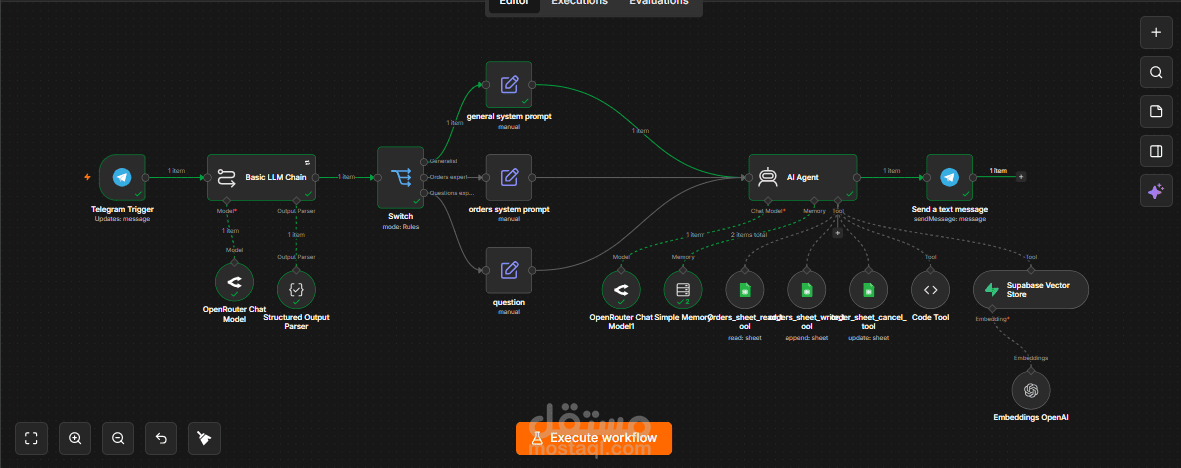
This project is an AI-powered restaurant customer support and order management system built with n8n, Telegram, OpenRouter, Google Sheets, Supabase Vector Store, and OpenAI Embeddings.
The workflow receives customer messages through Telegram, analyzes the user’s intent, and routes each request to the appropriate specialist:
General Customer Support
Restaurant Questions Expert
Orders Management Expert
The AI Agent can answer restaurant and menu questions using a Supabase knowledge base, create new orders, retrieve existing orders, cancel orders, and maintain conversation context across multiple messages.
Key Features
Telegram-based customer support chatbot
AI-powered intent classification
Automatic routing to specialized prompts
Menu and restaurant information retrieval
Retrieval-Augmented Generation using Supabase
New order creation
Order status lookup
Order cancellation
Unique 4-digit order ID generation
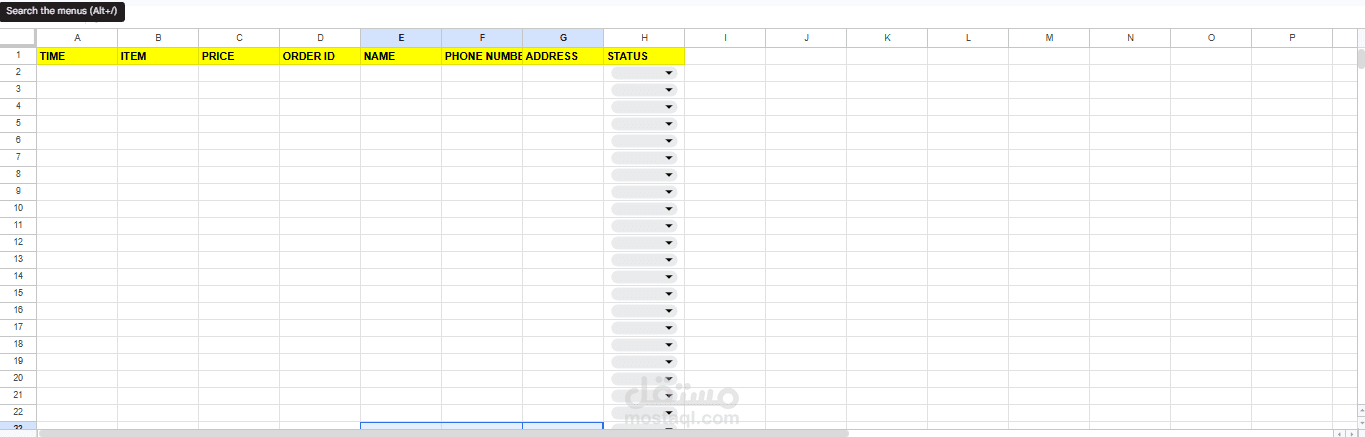
Google Sheets order database
Conversation memory per Telegram user
Structured LLM output for reliable routing
Automated customer responses
Workflow Architecture
Telegram Customer Message
↓
Basic LLM Intent Classifier
↓
Structured Output Parser
↓
Switch Router
┌──────┼─────────┐
↓ ↓ ↓
General Orders Questions
Prompt Prompt Prompt
└──────┼─────────┘
↓
AI Agent
┌──────┼──────────────────────────────┐
↓ ↓ ↓ ↓ ↓
Memory Read Order Add Order Cancel Restaurant
Order Order Knowledge Base
↓
Telegram Response
Intent Classification
The first language model analyzes each incoming message and assigns it to one of three categories.
Generalist
Handles general messages such as:
Hello
Good morning
Thank you
General conversation
Questions Expert
Handles questions related to:
Menu items
Prices
Ingredients
Restaurant information
Opening hours
Delivery
Restaurant policies
Orders Expert
Handles requests related to:
Creating a new order
Providing customer details
Asking about an existing order
Checking order status
Cancelling an order
Providing an order ID
Selecting specific meals or items
Order Management Capabilities
Create an Order
The AI collects the required customer information:
Customer name
Phone number
Delivery address
Selected items
Order price
Before saving the order, the assistant confirms the details with the customer.
A code tool generates a unique four-digit order ID, then the order is added to Google Sheets with the following fields:
TIME
ITEM
PRICE
ORDER ID
NAME
PHONE NUMBER
ADDRESS
STATUS
New orders are automatically assigned the status:
kitchen
After successfully saving the order, the customer receives the generated order ID.
Retrieve an Order
The assistant asks for or extracts the customer’s order ID from the conversation.
The Google Sheets read tool searches the ORDER ID column and returns the matching order information.
The assistant can then answer questions about:
Ordered items
Customer details
Order status
Existing order information
Cancel an Order
The assistant confirms the cancellation request and collects the order ID.
The Google Sheets cancellation tool searches for the matching order and updates its status to:
cancel
The assistant then confirms the cancellation to the customer.
Restaurant Knowledge Base
The project uses Supabase Vector Store as a restaurant knowledge base.
Restaurant information is converted into embeddings using OpenAI Embeddings and stored in Supabase. The AI Agent searches this knowledge base before responding to restaurant-related questions.
The knowledge base can contain:
Menu items
Prices
Ingredients
Restaurant opening hours
Delivery areas
Payment methods
Reservations
Current offers
Restaurant policies
Allergy information
Frequently asked questions
This Retrieval-Augmented Generation setup helps reduce hallucinations and keeps responses grounded in restaurant data.
Conversation Memory
The workflow uses Simple Memory with the Telegram chat ID as the session key:
Telegram Chat ID → Unique Conversation Session
This enables the assistant to remember previous customer messages, including:
Selected meals
Customer name
Phone number
Address
Order ID
Previous questions
Ongoing order details
The customer does not need to repeat information during the same conversation.
Technologies Used
n8n
Telegram Bot API
OpenRouter API
Large Language Models
Structured Output Parser
AI Agent
Google Sheets API
Supabase
Supabase Vector Store
OpenAI Embeddings
Retrieval-Augmented Generation
JavaScript Code Tool
Conversation Memory
Workflow Automation
Main Nodes
Telegram Trigger
Receives customer messages from Telegram.
Basic LLM Chain
Classifies customer intent and selects the appropriate specialist.
Structured Output Parser
Forces the classifier to return structured routing data.
Switch Node
Routes the message to the correct system prompt.
AI Agent
Handles customer conversations and decides which connected tool to use.
Simple Memory
Maintains conversation context for each Telegram customer.
Orders Sheet Read Tool
Retrieves orders using the customer’s order ID.
Orders Sheet Write Tool
Adds newly confirmed orders to Google Sheets.
Order Cancellation Tool
Updates the order status to cancelled.
Code Tool
Generates a random four-digit order ID.
Supabase Vector Store
Retrieves restaurant and menu information from the knowledge base.
Telegram Send Message
Sends the final AI response back to the customer.
Design Goals
The project was designed around the following principles:
Fast customer support
Natural conversational interaction
Accurate restaurant information
Automated order processing
Reduced manual work
Organized order records
Reliable intent routing
Context-aware conversations
Low hallucination through RAG
Easy workflow scalability
Example Use Cases
Restaurant Question
Customer:
How much is the Classic Beef Burger?
The assistant searches the Supabase knowledge base and returns the stored menu price.
New Order
Customer:
I want two chicken burgers.
The assistant asks for the missing customer details, confirms the complete order, generates an order ID, and saves the order to Google Sheets.
Order Status
Customer:
What happened to order 4821?
The assistant retrieves the matching order from Google Sheets and returns its current status.
Cancellation
Customer:
Please cancel order 4821.
The assistant confirms the request and changes the order status to cancel.
Future Improvements
WhatsApp Business integration
Payment gateway integration
Restaurant website chatbot
Automated delivery tracking
Kitchen notification system
Customer authentication
Order modification support
Multi-language conversations
Voice ordering
Table reservations
CRM integration
Customer feedback collection
Human agent handoff
Analytics dashboard
Multi-branch restaurant support
Project Goal
The objective of this project is to automate restaurant customer service and order management through a single intelligent conversational assistant.
By combining intent classification, AI Agents, conversation memory, Google Sheets tools, and a Supabase knowledge base, the system can answer customer questions, create and track orders, cancel existing orders, and provide a consistent support experience without requiring constant human intervention.