ManageDailyTasks — Desktop Task
تفاصيل العمل
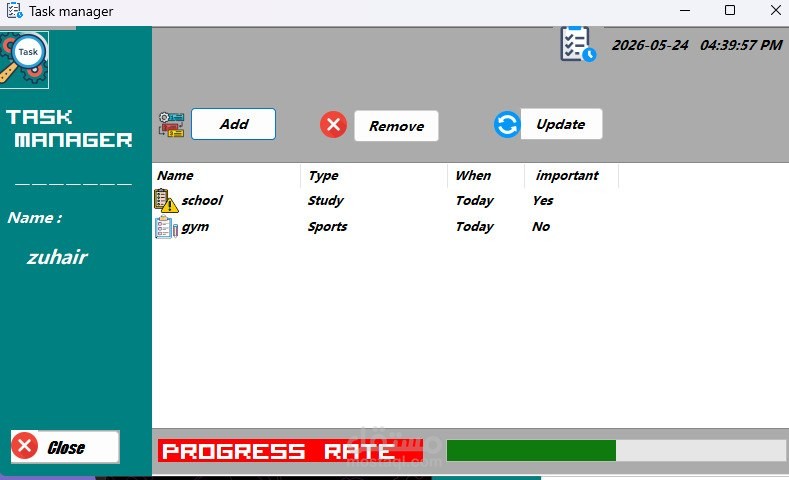
Welcome to ManageDailyTasks, a robust Windows Desktop application built using C# and WinForms on top of the .NET Framework 4.8. This project is a comprehensive Task Management system designed to guide users from a personalized onboarding experience to dynamically managing their daily routines, tracking priorities, and maintaining data persistence.
🔑 Key Features & Technical Architecture
1. User Onboarding & Personalization (SetupForm)
Custom Welcome Screen: Users are greeted with an elegant, modern UI requesting their name.
State Retention: The entered name is stored globally to personalize the user experience in subsequent dashboards.
Navigation Control: Includes standard interactive control buttons (Next and Close).
2. Comprehensive Task Management Dashboard (TaskManagerForm)
Dynamic Central Hub: A unified interface displaying the current real-time digital clock (including hours, minutes, and seconds) alongside the user's name.
Structured Data Grid (ListView): Displays all ongoing tasks cleanly mapped out under four dedicated metadata columns:
Task Name
Task Type
Due Date / Timeline
Priority Level
3. Smart Task Creator & Data Validation (AddTaskForm)
Input Enforcement (ErrorProvider): Implements strict validation constraints. The application prevents focus-shifting or form submission if fields are left blank.
Custom Control Mapping:
Text Boxes: For raw text inputs (Task Name).
Combo Boxes: Pre-seeded dropdown menus for categories, allowing customized user overrides.
Radio Buttons: Dynamic timeline switches (e.g., Today, Later).
Double-Check Verification: Triggers a confirmation MessageBox highlighting the captured data schema before committing it to the interface.
4. Advanced UX & Feedback Systems
Dynamic Progress Bar: A custom programmer-defined metric that automatically increments or decrements in real-time based on tasks added, deleted, or marked as completed.
Contextual Iconography: Differentiates task urgencies graphically. Critical/High-priority items display a distinguished warning/priority icon, whereas generic tasks render a default task icon.
Double-Click Completion Workflow: Users can double-click a row to prompt a completion dialog (Yes/No). Marking it Yes triggers a success message, safely disposes of the task, and smoothly calibrates the dynamic Progress Bar.
Defensive Deletion System: Restricts users from firing an arbitrary deletion. A row must be explicitly highlighted; otherwise, an input error workflow triggers