hrm-nawa tech
تفاصيل العمل
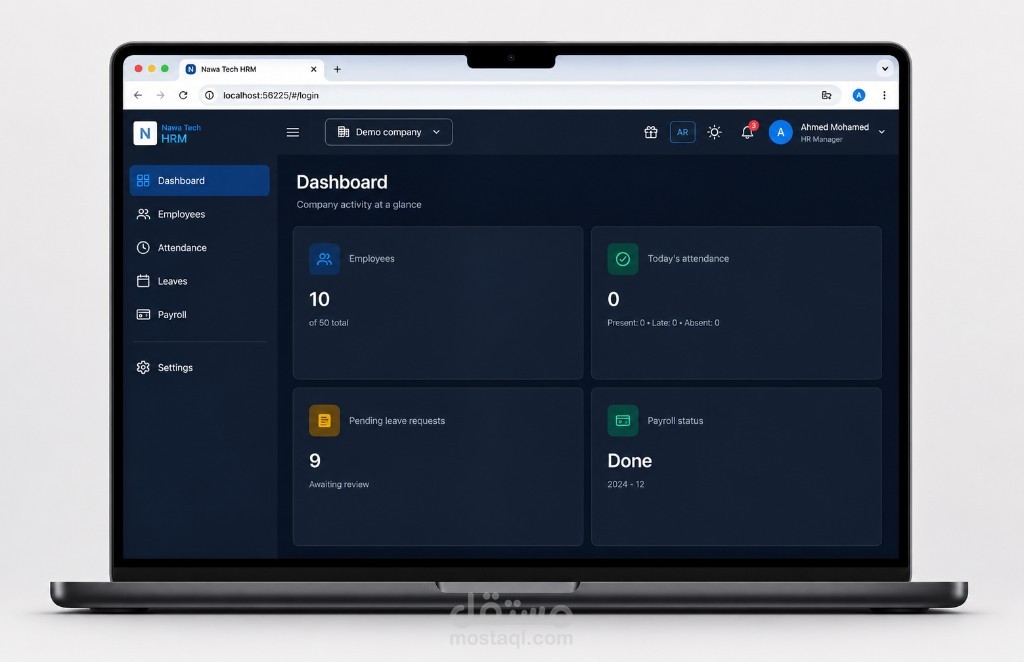
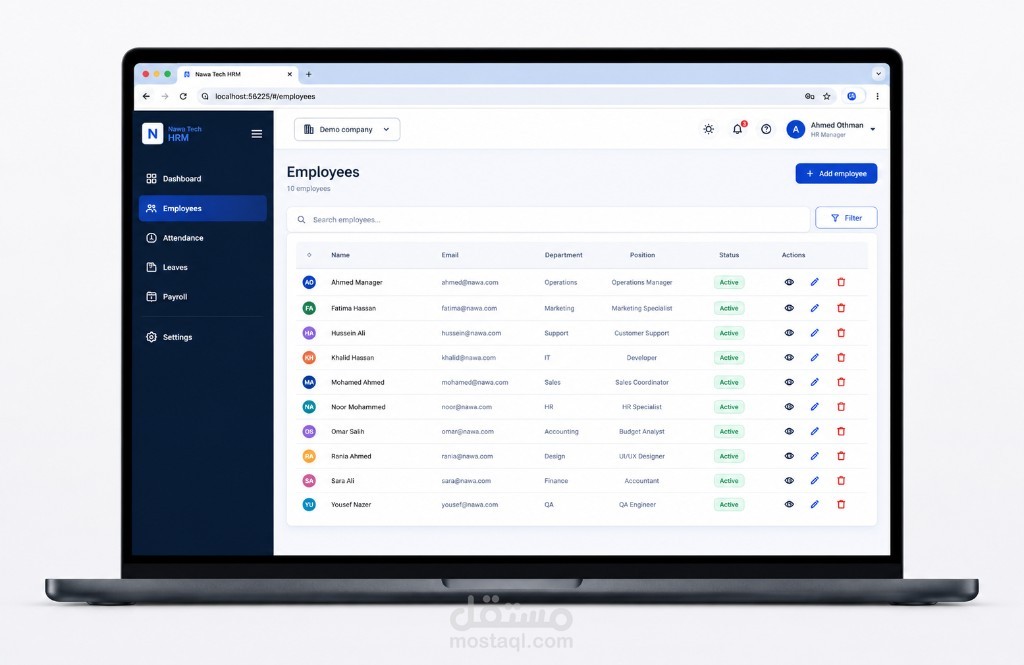
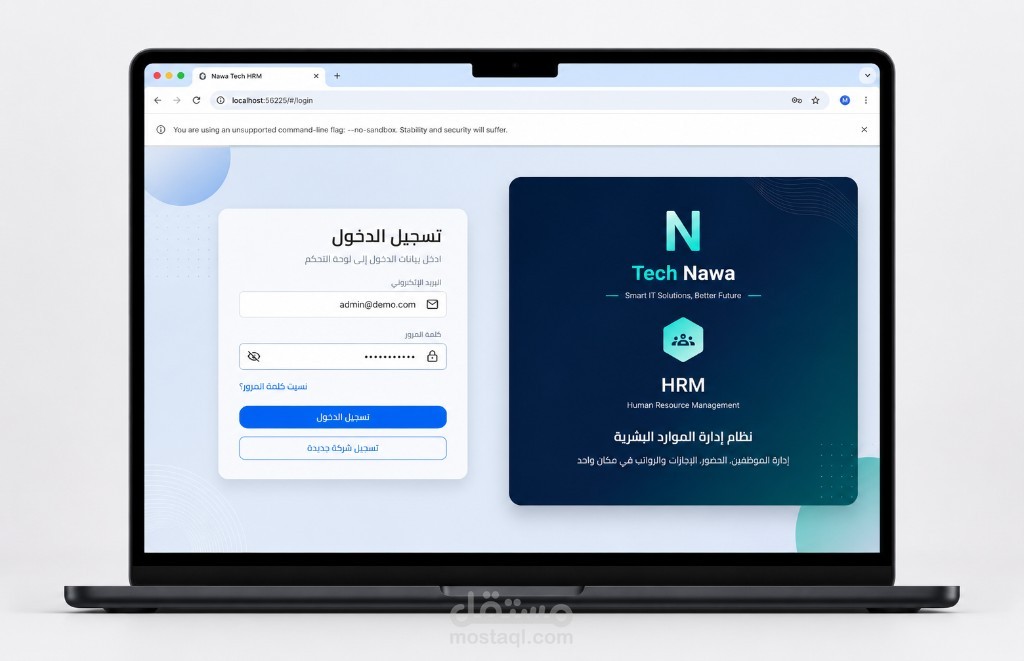
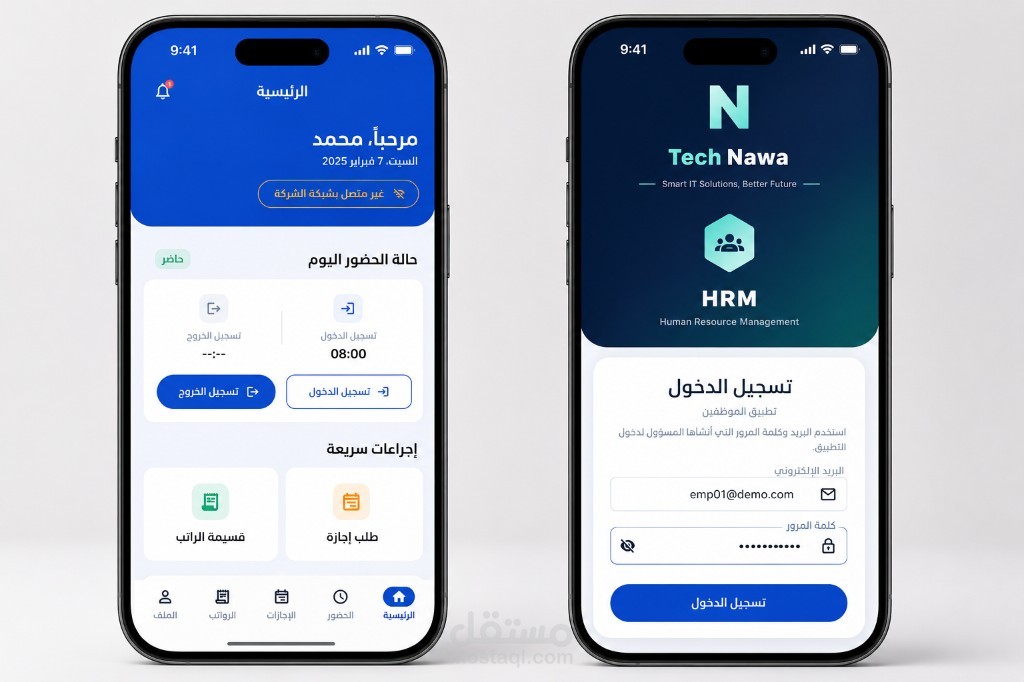
# HRM Platform — Portfolio Project
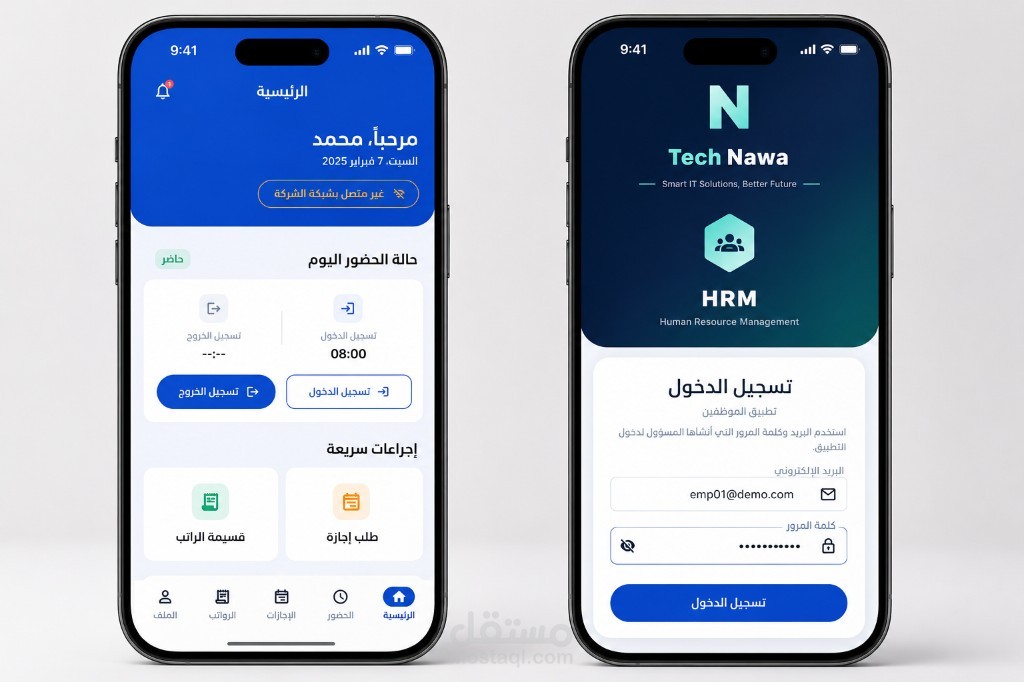
# منصة HRM — مشروع Portfolio
> **Full-Stack HR Management with AI** | **نظام إدارة موارد بشرية متكامل مع ذكاء اصطناعي**
A **portfolio demo project** by **Nawa Tech** — built with **Flutter + Laravel** to showcase full-stack, mobile, and AI skills.
مشروع **Portfolio** من **Nawa Tech** — مبني بـ **Flutter + Laravel** لعرض مهارات Full-Stack والموبايل والـ AI عند البحث عن عمل.
📖 **Detailed demo guide:** [DEMO.md](./DEMO.md) | **دليل التجربة التفصيلي:** [DEMO.md](./DEMO.md)
---
## 🎮 How to Try the Demo | كيفية تجربة المشروع
### English — Step by step
#### Prerequisites
- Flutter 3.x
- PHP 8.3+ & Composer
- Chrome (for web admin) + iOS Simulator or Android emulator (for employee app)
#### 1. Start the API (Laravel)
```bash
git clone https://github.com/ahmede...
cd hrm-nawa-tech/backend
composer install
cp .env.example .env
php artisan key:generate
php artisan migrate:fresh --seed
php artisan serve
```
✅ API available at: **`http://127.0.0.1:8000/api...
#### 2. Run Admin Dashboard (Web)
```bash
cd .. # back to project root
flutter pub get
flutter run -d chrome --web-port=3000
```
- Open **`http://localhost:3000/wel...
- Click **Try Admin Dashboard**
- Or go to **`http://localhost:3000/log...
| Role | Email | Password |
|------|-------|----------|
| **Admin** | `admin@demo.com` | `Admin12345!` |
> In web debug mode, the app auto-connects to `http://127.0.0.1:8000/api`.
#### 3. Run Employee App (Mobile)
```bash
flutter run -d ios # iPhone Simulator
# or
flutter run -d android # Android Emulator
```
Before login:
1. Open **Settings**
2. Enable **Use server API**
3. Set Base URL: `http://127.0.0.1:8000/api`
4. Save
| Role | Email | Password |
|------|-------|----------|
| **Employee** | `emp01@demo.com` | `Employee12345!` |
| Employee 2 | `emp02@demo.com` | `Employee12345!` |
> On a **physical device**, use your computer's LAN IP instead of `127.0.0.1`
> Example: `http://192.168.1.10:8000/...`
#### 4. What to explore
| Area | Highlights |
|------|------------|
| **Dashboard** | Stats, pending leaves, activity |
| **Employees** | CRUD, profiles, search |
| **Attendance** | Daily records, export |
| **AI Command Center** | Assistant, SLO, escalations, reports |
| **Recruitment** | Jobs, candidates, AI matching |
| **Settings** | AR/EN language, dark/light theme |
#### 5. App icon
The mobile app uses the **HRM logo** (not the default Flutter icon).
After icon changes, **uninstall and reinstall** the app on the simulator/device to see the new icon.
---
### العربية — خطوة بخطوة
#### المتطلبات
- Flutter 3.x
- PHP 8.3+ و Composer
- Chrome (لوحة الويب) + محاكي iOS أو Android (تطبيق الموظف)
#### 1. تشغيل الـ API (Laravel)
```bash
git clone https://github.com/ahmede...
cd hrm-nawa-tech/backend
composer install
cp .env.example .env
php artisan key:generate
php artisan migrate:fresh --seed
php artisan serve
```
✅ الـ API يعمل على: **`http://127.0.0.1:8000/api...
#### 2. تشغيل لوحة الإدارة (ويب)
```bash
cd .. # العودة لجذر المشروع
flutter pub get
flutter run -d chrome --web-port=3000
```
- افتح **`http://localhost:3000/wel...
- اضغط **جرّب لوحة الإدارة**
- أو مباشرة: **`http://localhost:3000/log...
| الدور | البريد | كلمة المرور |
|-------|--------|-------------|
| **أدمن** | `admin@demo.com` | `Admin12345!` |
> في وضع التطوير على الويب، التطبيق يتصل تلقائياً بـ `http://127.0.0.1:8000/api`.
#### 3. تشغيل تطبيق الموظف (موبايل)
```bash
flutter run -d ios # محاكي iPhone
# أو
flutter run -d android # محاكي Android
```
قبل تسجيل الدخول:
1. افتح **الإعدادات**
2. فعّل **Use server API**
3. ضع العنوان: `http://127.0.0.1:8000/api`
4. احفظ
| الدور | البريد | كلمة المرور |
|-------|--------|-------------|
| **موظف** | `emp01@demo.com` | `Employee12345!` |
| موظف 2 | `emp02@demo.com` | `Employee12345!` |
> على **هاتف حقيقي**، استخدم IP جهازك على الشبكة بدلاً من `127.0.0.1`
> مثال: `http://192.168.1.10:8000/...`
#### 4. ماذا تجرب؟
| القسم | أبرز المميزات |
|-------|----------------|
| **لوحة التحكم** | إحصائيات، إجازات معلقة، نشاط |
| **الموظفون** | إضافة/تعديل، ملفات، بحث |
| **الحضور** | سجلات يومية، تصدير |
| **مركز AI** | مساعد، SLO، تصعيد، تقارير |
| **التوظيف** | وظائف، مرشحين، مطابقة AI |
| **الإعدادات** | عربي/إنجليزي، وضع ليلي/نهاري |
#### 5. أيقونة التطبيق
تطبيق الموبايل يستخدم **شعار HRM** (وليس أيقونة Flutter الافتراضية).
بعد تغيير الأيقونة، **احذف التطبيق وأعد تثبيته** على المحاكي/الهاتف لرؤية الأيقونة الجديدة.
---
## 🚀 Future: SaaS Multi-Tenant Platform | المستقبل: منصة SaaS متعددة الشركات
> **Current status:** Portfolio demo with one demo tenant.
> **الوضع الحالي:** عرض Portfolio مع tenant تجريبي واحد.
This codebase is **architecturally ready** to evolve into a commercial **SaaS HRM platform** where multiple companies subscribe independently.
الكود **جاهز معمارياً** للتحويل لاحقاً إلى **منصة SaaS تجارية** تستخدمها عدة شركات بالاشتراك.
### Already built (foundation) | موجود بالفعل
| Capability | Status |
|------------|--------|
| Multi-tenant (`company_id` isolation) | ✅ Ready |
| Admin Web + Employee Mobile | ✅ Ready |
| RBAC (roles & permissions) | ✅ Ready |
| AI features (assistant, recruitment, reports) | ✅ Ready |
| AI governance (quotas, rollout, audit) | ✅ Ready |
| Arabic + English (RTL/LTR) | ✅ Ready |
### Planned for SaaS launch | مخطط لإطلاق SaaS
| Phase | Feature |
|-------|---------|
| **Phase 1** | Company self-registration & onboarding |
| **Phase 2** | Subscription plans (Starter / Growth / Enterprise) |
| **Phase 3** | Payment gateway (Moyasar / Stripe) |
| **Phase 4** | Plan limits (employees, AI features, recruitment) |
| **Phase 5** | Super-admin panel for all tenants |
| **Phase 6** | Production deploy (`hrm.nawatech.com`) |
```
Portfolio Demo (now) SaaS Product (later)
───────────────────── ────────────────────
1 demo tenant → Many companies
Login only → Register + Subscribe
Free showcase → Monthly billing
nawatech.com/portfolio → hrm.nawatech.com
```
---
## 🎯 Features | المميزات
### Admin Panel (Web) | لوحة الأدمن
Dashboard · Employees · Attendance · Leave · Payroll · Recruitment · AI Command Center · Performance · Reports · Settings
### Employee App (Mobile) | تطبيق الموظف
Home · Attendance · Leave · Payslip · Profile · Notifications
---
## 🏗️ Architecture | المعمارية
```
hrm-nawa-tech/
├── lib/ # Flutter — Web Admin + Mobile Employee
│ ├── core/ # API, auth, repositories, AI
│ └── features/ # admin/ + employee/ + welcome/
├── backend/ # Laravel REST API + AI services
├── assets/images/ # HRM logo + app icon source
└── test/ # Flutter + PHPUnit tests
```
---
## 🛠️ Tech Stack | التقنيات
| Layer | Stack |
|-------|-------|
| **Frontend** | Flutter 3, GoRouter, ARB i18n (AR/EN) |
| **Backend** | Laravel, Sanctum, SQLite/MySQL |
| **AI** | OpenAI / Gemini gateway, prompt registry |
| **Patterns** | Clean Architecture, Repository, Multi-tenant |
---
## 🧪 Tests | الاختبارات
```bash
cd backend && php artisan test
flutter test
```
---
## 👨💻 Developer | المطوّر
**Ahmed Ehab Mohammed — Nawa Tech**
📧 ahmed96it96@gmail.com
🌐 [nawatech.com](https://nawatech.com)
💻 [GitHub — hrm-nawa-tech](https://github.com/ahmede...)
## 📄 License
Portfolio demonstration project. Contact the author for commercial use or SaaS licensing.