Mezo Food App
تفاصيل العمل
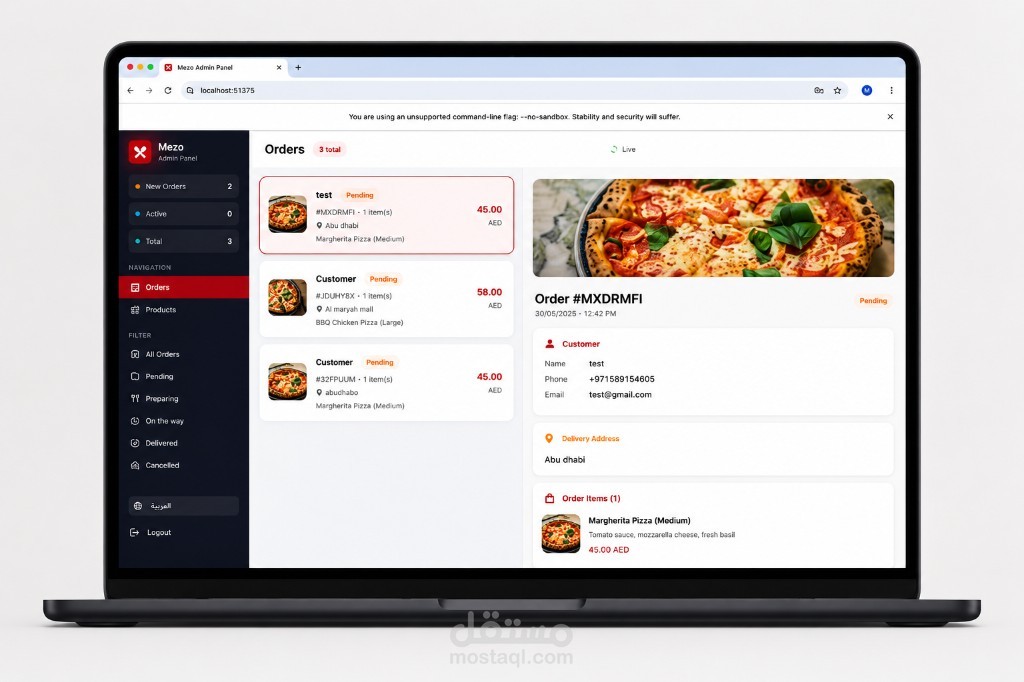
# Mezo Food App
## About | نبذة
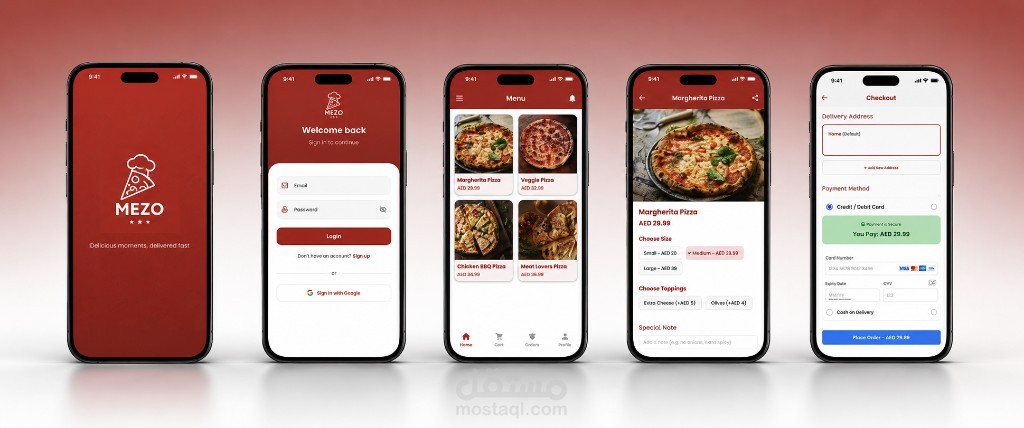
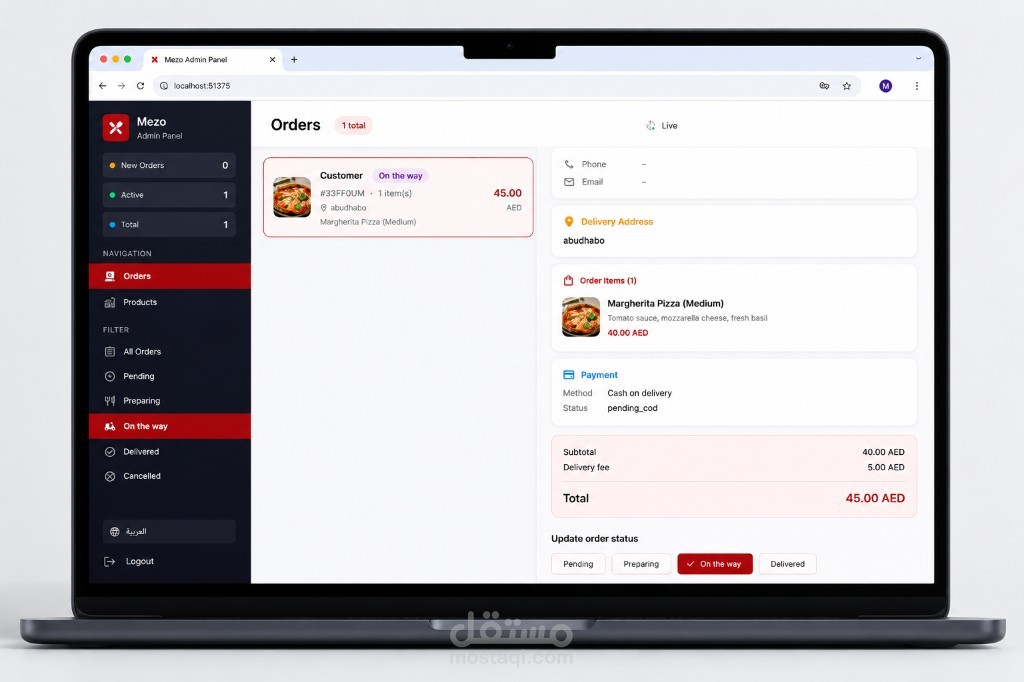
**English:** Food ordering and delivery app — browse menus, cart, checkout with Google Maps address picker, Stripe/demo/cash payments, order tracking, and push notifications. Includes a responsive **admin web dashboard** for orders and product management.
**العربية:** تطبيق لطلب وتوصيل الطعام — تصفح القائمة، السلة، الدفع مع اختيار العنوان من خرائط Google، تتبع الطلبات، وإشعارات. يتضمن **لوحة أدمن ويب** لإدارة الطلبات والمنتجات.
---
تطبيق طلب طعام (Flutter) مع لوحة أدمن ويب، Firebase، خرائط Google، ودفع Stripe.
Food ordering Flutter app with admin web dashboard, Firebase backend, Google Maps, and Stripe payments.
---
## Features
### Customer app (iOS / Android)
- Browse menu from Firestore (with demo fallback)
- Cart, favorites, checkout
- **Google Maps** — pick delivery location on map + GPS
- Order tracking (My Orders + status timeline)
- Arabic / English (RTL)
- Sign in with email or Google
- Stripe card payment + demo test card + cash on delivery
- Push notifications (order status)
### Admin panel (Web)
- Responsive dashboard (orders list + detail)
- Update order status (pending → preparing → on the way → delivered)
- **Product management** — add, edit, delete menu items
- Delivery address + map preview when coordinates exist
- Arabic / English sidebar
- Admin push notifications for new orders
### Backend (Firebase)
- **Firestore** — users, products, orders, admins
- **Cloud Functions** — Stripe PaymentIntent, push notifications
- Security rules for customers and admins
---
## Tech stack
| Layer | Technology |
|--------|------------|
| Mobile / Web UI | Flutter 3, BLoC |
| Backend | Firebase Auth, Firestore, Cloud Functions, FCM |
| Payments | Stripe (`flutter_stripe`) |
| Maps | `google_maps_flutter`, Geolocator, Geocoding |
| Admin | Flutter Web (`lib/admin/main_admin.dart`) |
---
## Prerequisites
- [Flutter SDK](https://docs.flutter.dev/...) (SDK `>=3.2.3`)
- Firebase project: `mezo-food-app-a0710`
- Google Cloud billing enabled (required for Maps + Cloud Functions)
- Maps APIs enabled: Maps SDK (Android/iOS), Geocoding API
- (Optional) Stripe test keys for real card flow
---
## Quick start
### 1. Clone and install
```bash
git clone git@github.com:ahmedehab96-c/mezo-food-app.git
cd mezo-food-app
flutter pub get
```
### 2. Firebase config
Firebase config files are included for project `mezo-food-app-a0710`:
- `android/app/google-services.json`
- `ios/Runner/GoogleService-Info.plist`
- `lib/firebase_options.dart`
To connect another Firebase project:
```bash
bash scripts/connect_firebase.sh
```
### 3. Stripe (optional)
```bash
cp lib/config/payment_config.local.example.dart lib/config/payment_config.local.dart
# Add your pk_test_... key, or:
bash scripts/setup_stripe.sh
```
For Cloud Functions secret (`sk_test_...`):
```bash
# functions/.env.mezo-food-app-a0710 (gitignored)
STRIPE_SECRET_KEY=sk_test_...
```
### 4. Run customer app
```bash
flutter run
```
### 5. Run admin panel (Chrome)
```bash
bash scripts/run_admin_web.sh
# or:
flutter run -d chrome -t lib/admin/main_admin.dart
```
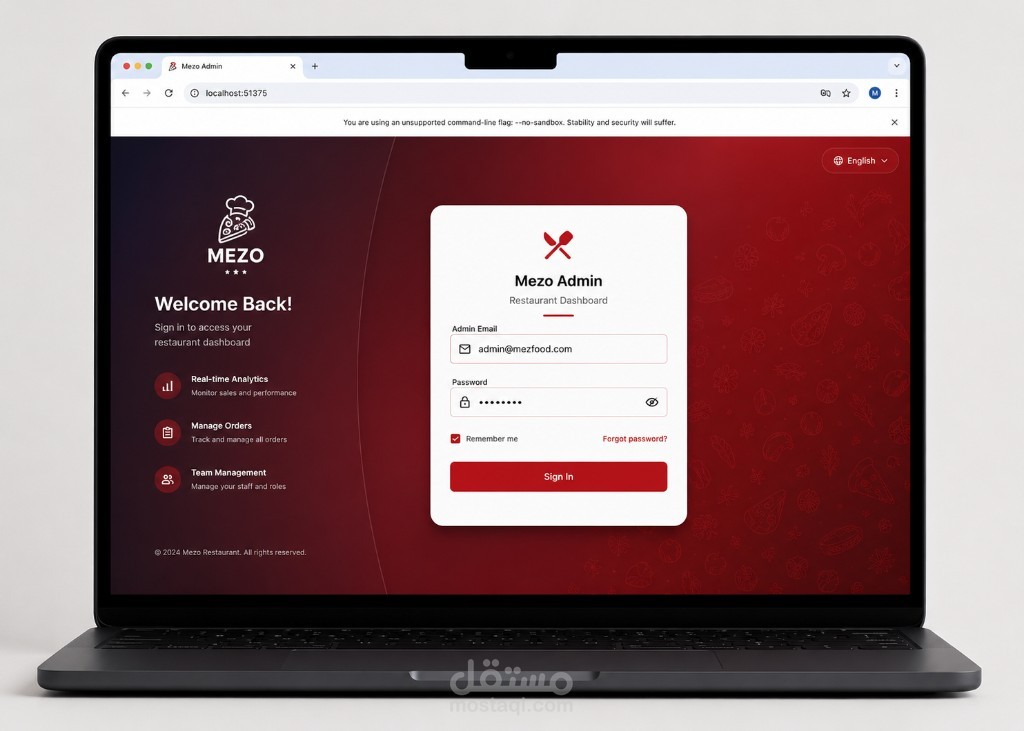
**Admin login:** account in Firebase Auth with document `admins/{uid}` in Firestore.
```bash
bash scripts/add_admin.sh
```
---
## Google Maps setup
Maps use Firebase API keys (already configured in native projects).
**Google Cloud Console** (project `mezo-food-app-a0710`):
1. Enable **Maps SDK for Android**, **Maps SDK for iOS**, **Geocoding API**
2. Link a **billing account**
3. API keys must allow Maps services (done for Android/iOS Firebase keys)
**Usage in app:** Checkout or Profile → **Pick on map** → confirm location.
---
## Deploy Firebase
```bash
# Firestore rules + indexes
firebase deploy --only firestore
# Cloud Functions (requires Blaze / billing)
firebase deploy --only functions
# Push notification functions
bash scripts/deploy_push_notifications.sh
```
---
## Project structure
```
lib/
├── main.dart # Customer app entry
├── admin/ # Admin web app
│ ├── main_admin.dart
│ ├── screens/ # Dashboard, login, products
│ └── services/ # Orders, products, push
├── blocs/ # Auth, cart, favorites
├── config/ # Payment, maps, auth config
├── screens/ # Home, cart, checkout, profile, maps
├── services/ # Firebase, payment, location, push
├── models/ # Product, order, delivery location
└── l10n/ # AR / EN strings
firebase/
├── firestore.rules
├── firestore.indexes.json
└── seed_products.json
functions/
└── index.js # Stripe + FCM Cloud Functions
scripts/
├── run_admin_web.sh
├── setup_stripe.sh
├── add_admin.sh
└── deploy_push_notifications.sh
```
---
## Scripts
| Script | Description |
|--------|-------------|
| `scripts/run_admin_web.sh` | Run admin panel in Chrome |
| `scripts/setup_stripe.sh` | Configure Stripe publishable key locally |
| `scripts/add_admin.sh` | Add admin UID to Firestore |
| `scripts/connect_firebase.sh` | Apply Firebase project files |
| `scripts/deploy_push_notifications.sh` | Deploy FCM Cloud Functions |
| `scripts/seed_production.js` | Seed products to Firestore |
---
## Environment & secrets (gitignored)
| File | Purpose |
|------|---------|
| `lib/config/payment_config.local.dart` | Stripe publishable key |
| `lib/config/maps_config.local.dart` | Optional custom Maps API key |
| `functions/.env*` | Stripe secret key for Cloud Functions |
Copy from `*.example.dart` templates before running.
---
## Payment modes
1. **Cash on delivery** — always available
2. **Demo card** — one-tap test payment when `pk_test_` key is set (no Cloud Functions)
3. **Stripe** — real card flow via Cloud Function `createPaymentIntent` (requires Functions deploy)
## License
Private project — Mezo Food.