CRM WorkFlow
تفاصيل العمل
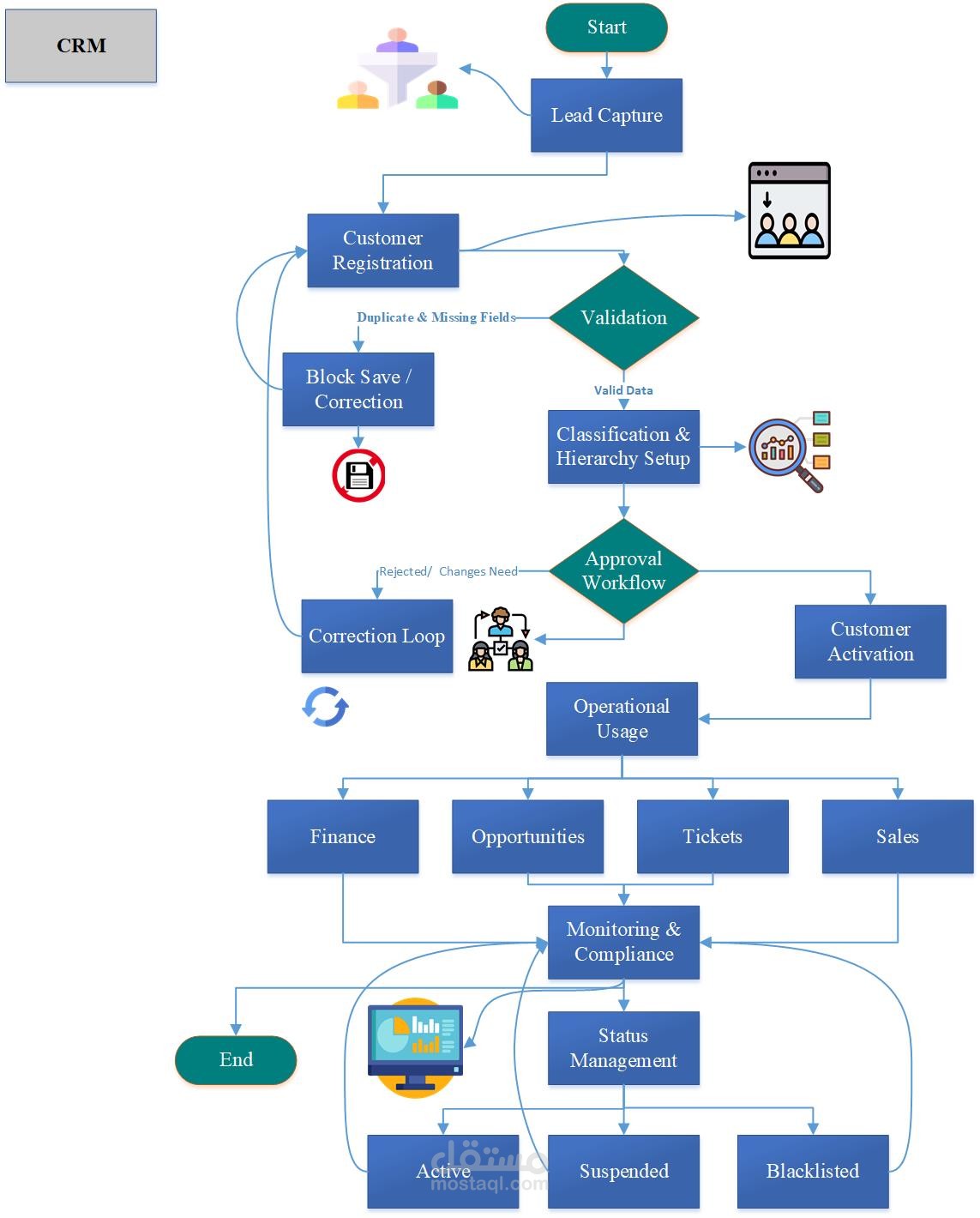
CRM Workflow Description
Start
The process begins with Lead Capture, where new potential customers are collected from various sources.
Customer Registration
The captured lead moves to Customer Registration, where basic information is entered into the system.
Validation
The system checks for Duplicate & Missing Fields.
If issues are found, the record is Blocked and sent for Correction.
Once corrections are made and data is Valid, the process continues.
Classification & Hierarchy Setup
The customer is classified according to business rules (e.g., type, segment, region).
A Hierarchy Setup is established to define relationships (e.g., parent-child accounts, multi-site structures).
Approval Workflow
If the classification or hierarchy requires review, it goes through an Approval Workflow.
Rejected / Changes Needed: If rejected, it enters a Correction Loop for adjustments.
Once approved, the customer is ready for Customer Activation.
Customer Activation
The customer record is officially activated, enabling access to operational systems and services.
Operational Usage
The activated customer is now used across multiple business functions:
Finance: Invoicing, credit management, payments.
Opportunities: Sales pipelines and future deals.
Tickets: Support requests and service management.
Sales: Ongoing sales activities and order management.
Monitoring & Compliance
All customer activities are monitored for compliance with internal policies and external regulations.
The customer Status can be updated based on monitoring results:
Active: Normal operational status.
Suspended: Temporarily restricted (e.g., due to payment issues or compliance review).
Blacklisted: Permanently blocked from doing business.
End
The workflow concludes with the customer being managed under one of the three statuses, with continuous monitoring throughout the lifecycle.