DHCP Relay & Multi-VLAN Network Lab | Cisco Packet Tracer
تفاصيل العمل
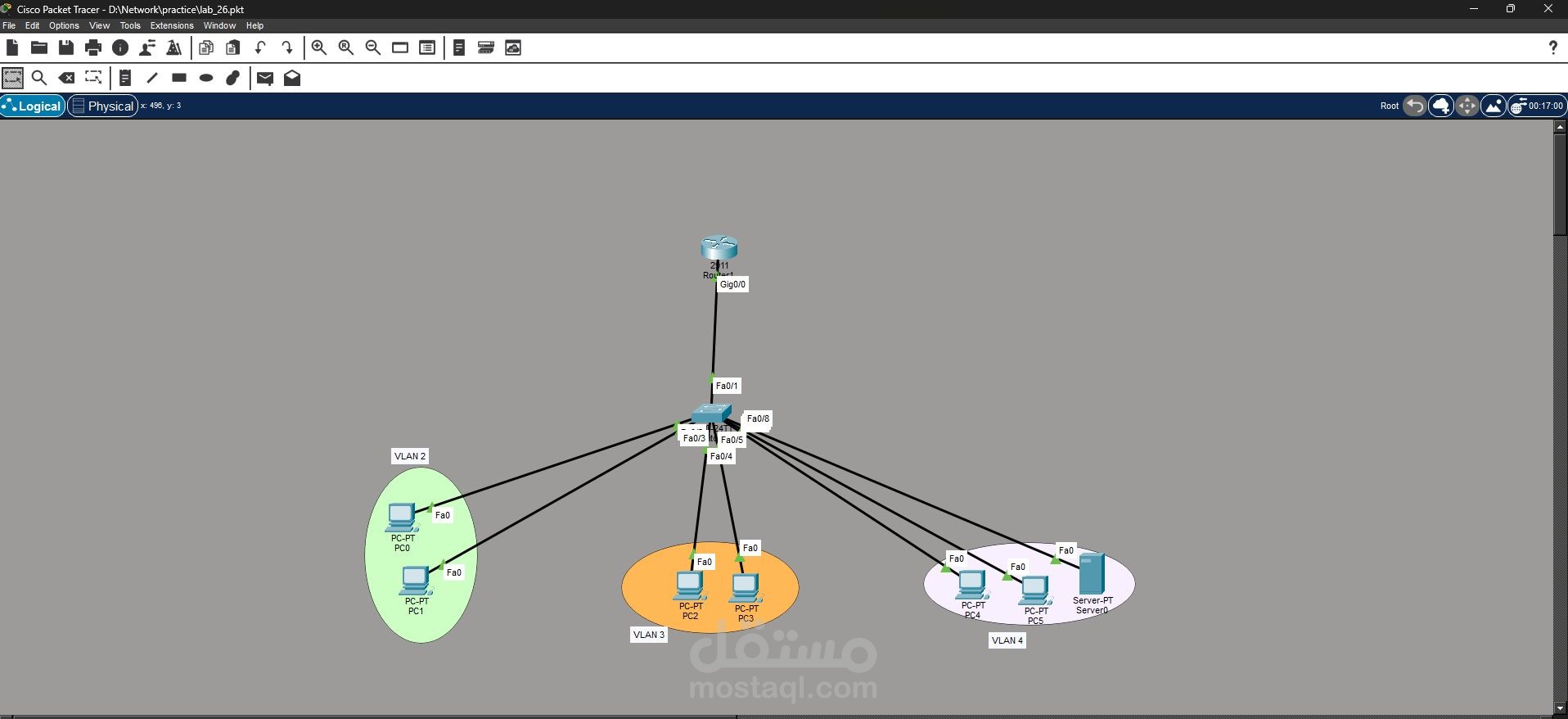
DHCP Relay & Multi-VLAN Network Lab | Cisco Packet Tracer
As part of my continuous hands-on learning in network administration, I built a network topology using Cisco Packet Tracer to practice VLAN segmentation and centralized DHCP services.
In this design, all PCs located in VLAN 1, VLAN 2, and VLAN 3 automatically obtain their IP addresses from a central DHCP server placed in VLAN 4
? Key Concepts Implemented
✔ VLAN segmentation to separate network traffic
✔ Deployment of a centralized DHCP server
✔ Configuration of a DHCP Relay Agent on the router
✔ Inter-VLAN communication through router configuration
✔ Assigning switch access ports to different VLANs
To allow devices in multiple VLANs to receive IP addresses from the DHCP server, the router was configured as a DHCP Relay Agent using the `ip helper-address` command.
This configuration forwards DHCP broadcast requests from client VLANs to the DHCP server located in another VLAN.
? Technologies Used
• Cisco Packet Tracer
• VLAN configuration
• DHCP server setup
• DHCP relay configuration
• Router and switch configuration
? This lab improved my understanding of how enterprise networks implement centralized IP address management across multiple VLANs, a common approach used in real-world network infrastructures.