Information Technology Institute
تفاصيل العمل
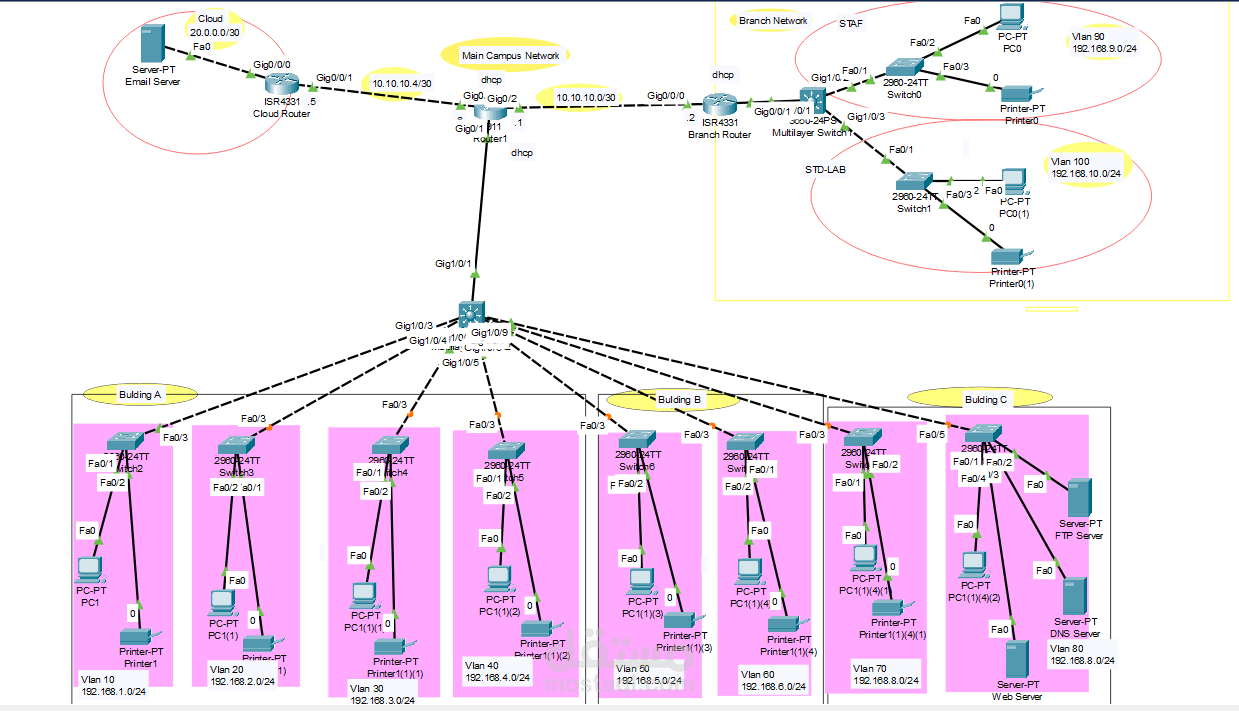
Design and Implementation of a
Campus/University System
Network Design
University which has two campuses situated 20 miles apart.
The university’s students and staff are distributed in 4
faculties; these include the faculties of Health and Sciences;
Business; Engineering/Computing and Art/Design. Each
member of staff has a PC and students have access to PCs in
the labs. Create a network topology with the main
components to support the following:
University location.
Main Campus - Building A: Administrative staff in the departments of
management, HR and finance. The admin staff PCs are
distributed in the building offices and it is expected that
they will share some networking equipment (Hint: use of
VLANs is expected here). The Faculty of Business is also
situated in this building - Building B: Faculty of Engineering and Computing and
Faculty of Art and Design.
- Building C: Students’ labs and IT department. The IT
department hosts the University Web server and other
servers - There is also an email server hosted externally on
the cloud.
Smaller campus:
Faculty of Health and Sciences (staff and students’ labs are
situated on separate floors)
Each department/faculty is expected to be on its own
separate IP network.
The switches should be configured with appropriate VLANs
and security settings.
Routing Protocol will be used to provide routing for the
routers in the internal network and static routing for the
external server.
The devices in building A will be expected to acquire
dynamic IP addresses from a router-based DHCP server.
Configure in Packet Tracer the network with appropriate
settings to achieve the connectivity and functionalities
specified in the requirements.
Technologies Implemented
Creating a network topology using Cisco Packet Tracer.
1. Hierarchical Network Design.
2. Connecting Networking devices with Correct cabling.
3. Creating VLANs and assigning ports VLAN numbers.
4. Subnetting and IP Addressing.
5. Configuring Inter-VLAN Routing (Router on a stick).
6. Configuring DHCP Server (Router as the DHCP
Server).
7. Configuring SSH for secure Remote access.
8. Configuring any routing protocol.
9. Configuring switchport security or Port-Security on the
switches.
10. Host Device Configurations.
11. Test and Verifying Network Communication.