Implement VLANs and Trunking
تفاصيل العمل
Objectives
Part 1: Configure VLANs
Part 2: Assign Ports to VLANs
Part 3: Configure Static Trunking
Part 4: Configure Dynamic Trunking
Background
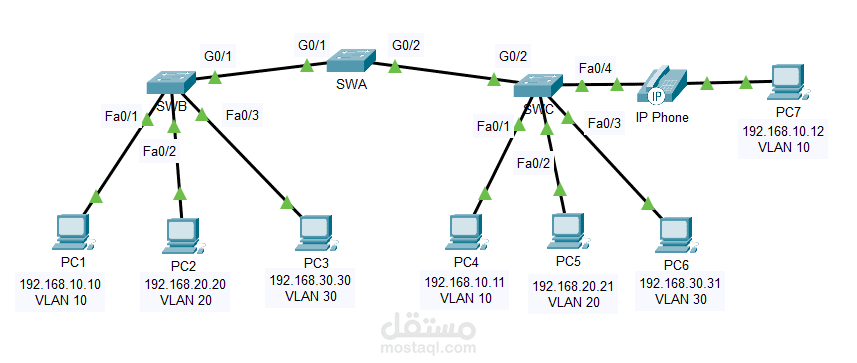
You are working in a company that is getting ready to deploy a set of new 2960 switches in a branch office. You are working in the lab to test out the VLAN and trunking configurations that are planned. Configure and test the VLANs and trunks.
Instructions
Part 1: Configure VLANs
Configure VLANs on all three switches. Refer to the VLAN Table. Note that the VLAN names must match the values in the table exactly.
VLAN Table
VLAN Number
VLAN Name
10
Admin
20
Accounts
30
HR
40
Voice
99
Management
100
Native
Part 2: Assign Ports to VLANs
Step 1: Assign access ports to VLANs
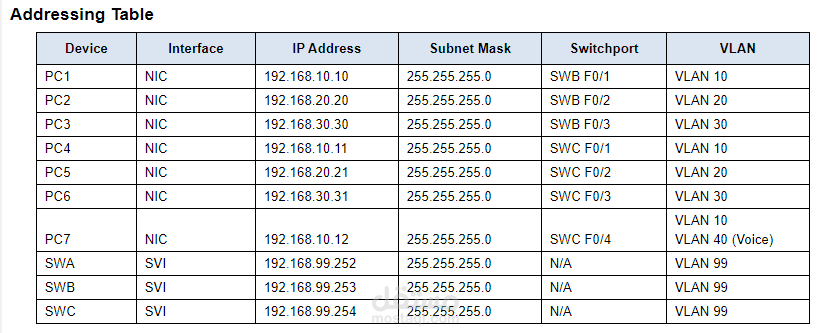
On SWB and SWC, assign ports to the VLANs. Refer to the Addressing Table.
Step 2: Configure the Voice VLAN port
Configure the appropriate port on switch SWC for voice VLAN functionality.
Step 3: Configure the virtual management interfaces
a. Create the virtual management interfaces, on all three switches.
b. Address the virtual management interfaces according to the Addressing Table.
c. The switches should not be able to ping each other.
Part 3: Configure Static Trunking
a. Configure the link between SWA and SWB as a static trunk. Disable dynamic trunking on this port.
b. Disable DTP on the switch port on both ends of the trunk link.
c. Configure the trunk with the native VLAN and eliminate native VLAN conflicts if any.
Part 4: Configure Dynamic Trunking
a. Assume that the trunk port on SWC is set to the default DTP mode for 2960 switches. Configure G0/2 on SWA so that it successfully negotiates trunking with SWC.
b. Configure the trunk with the native VLAN and eliminate native VLAN conflicts if any.