Network documentation
تفاصيل العمل
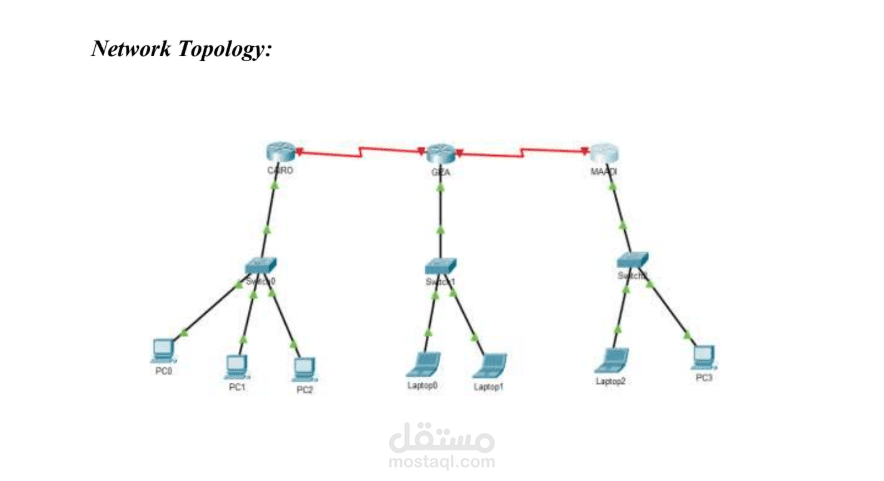
1. Network Topology Overview:
Three branches, each with:
- A router (CAIRO, GIZA, MAADI)
- A switch
- Connected end-user devices (PCs or laptops)
- DHCP automatically assigns IPs
2. IP Addressing Table
CAIRO Branch – 192.168.1.0/29
Subnet Mask: 255.255.255.248
Range: 192.168.1.1 – 192.168.1.6
Broadcast: 192.168.1.7
Device IP Address Notes
CAIRO Router 192.168.1.1 Default Gateway
PC0 192.168.1.2 DHCP
PC1 192.168.1.3 DHCP
PC2 192.168.1.4 DHCP
(Free) 192.168.1.5–6 Available for future
GIZA Branch – 192.168.2.0/29
Subnet Mask: 255.255.255.248
Range: 192.168.2.1 – 192.168.2.6
Broadcast: 192.168.2.7
Device IP Address Notes
GIZA Router 192.168.2.1 Default Gateway
Laptop0 192.168.2.2 DHCP
Laptop1 192.168.2.3 DHCP
(Free) 192.168.2.4–6 Available for future
MAADI Branch – 192.168.3.0/29
Subnet Mask: 255.255.255.248
Range: 192.168.3.1 – 192.168.3.6
Broadcast: 192.168.3.7
Device IP Address Notes
MAADI Router 192.168.3.1 Default Gateway
Laptop2 192.168.3.2 DHCP
PC3 192.168.3.3 DHCP
(Free) 192.168.3.4–6 Available for future
3. DHCP Configuration Summary
Each router runs a DHCP pool to automatically assign IPs to local devices.
DHCP excludes the router’s IP as a default gateway and assigns remaining
usable ones.
4. Summary
- Every branch uses a /29 subnet (supports up to 6 hosts, can be edited later).
- Routers serve as DHCP servers and default gateways.
- Devices receive IPs dynamically in their subnet.
- IP ranges are non-overlapping and properly segmented.