Building a Full-Stack Monitoring System with Docker, Portainer, Node Exporter, Prometheus, and Grafana
تفاصيل العمل
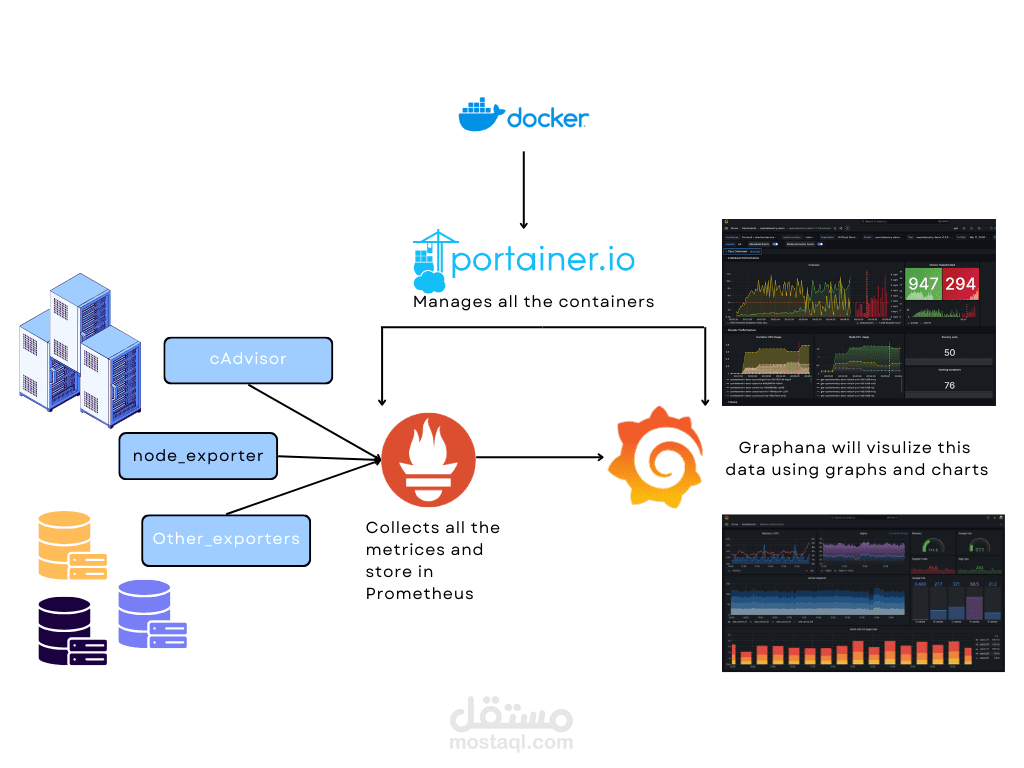
1. Prerequisites
Docker: Basic knowledge and installation.
Portainer: For managing Docker containers.
Node Exporter: For collecting hardware and OS metrics.
Prometheus: For collecting and querying metrics.
Grafana: For visualizing the metrics.
2. Setting Up Docker and Portainer
Installing Docker: Step-by-step guide to install Docker on your system.
Installing Portainer: Instructions on setting up Portainer to manage Docker containers.
3. Deploying Node Exporter
Purpose of Node Exporter: Explain what Node Exporter is and why it's essential.
Installation and Configuration: How to deploy Node Exporter using Docker.
4. Setting Up Prometheus
Introduction to Prometheus: Overview of Prometheus' role in monitoring.
Configuration: Steps to configure Prometheus to scrape metrics from Node Exporter.
Docker Deployment: Deploying Prometheus using Docker.
5. Integrating Grafana
Overview of Grafana: Explain how Grafana works with Prometheus to visualize data.
Installation: Step-by-step installation of Grafana.
Connecting to Prometheus: How to link Grafana with Prometheus as a data source.
Building Dashboards: A guide on creating custom dashboards in Grafana.
6. Managing the Monitoring Stack with Portainer
Overview of Portainer's Role: How Portainer simplifies the management of Docker containers.
Deploying and Managing Containers: Using Portainer to deploy and manage the Node Exporter, Prometheus, and Grafana containers.
7. Monitoring and Alerts
Setting Up Alerts in Prometheus: Configuring alert rules.
Integrating Alerts with Grafana: Visualizing and managing alerts in Grafana.
8. Conclusion
Summary: Recap of the entire setup process.
Benefits of Using Open-Source Solutions: Emphasize the cost-efficiency and flexibility of using open-source tools.
Further Reading/Resources: Links to documentation and further reading.
9. Appendix
Troubleshooting Tips: Common issues and fixes.
Useful Commands: Quick reference for Docker and other tools.