Task Management System
تفاصيل العمل
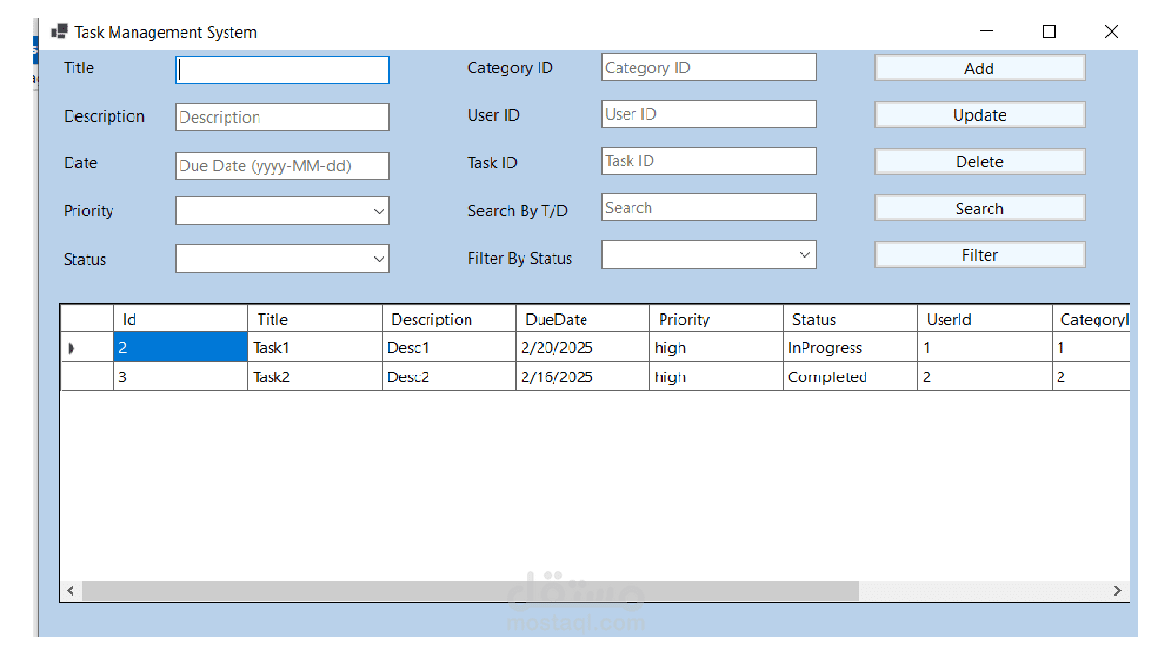
Form Description: Task Management System
Form Sections:
Task Information Input:
Title: Textbox to enter the task title.
Description: Textbox for a brief description of the task.
Date: Date input field (format: yyyy-MM-dd) for specifying the due date.
Priority: Dropdown to select the priority level (e.g., high, medium, low).
Status: Dropdown to select the current status of the task (e.g., In Progress, Completed).
Category ID: Textbox for specifying the category to which the task belongs.
User ID: Textbox for the ID of the user assigned to the task.
Task Management Controls:
Add: Button to add a new task based on the entered details.
Update: Button to update the selected task's information.
Delete: Button to delete the selected task.
Search: Button to search for tasks using the search field.
Filter: Button to filter tasks based on the selected status.
Search & Filter:
Task ID: Input field for searching tasks by their ID.
Search By T/D: Textbox to search tasks by Title or Description.
Filter By Status: Dropdown to select a status for filtering the displayed tasks.
Task List Section (Data Grid):
Displays tasks in a tabular format with the following columns:
Id: Unique identifier for the task.
Title: Name of the task.
Description: Task details.
Due Date: Deadline for task completion.
Priority: Level of task importance (e.g., high).
Status: Current state of the task (e.g., InProgress, Completed).
UserId: Identifier for the user assigned to the task.
CategoryId: Identifier for the category of the task.
Highlighted Features:
Task Tracking: Enables tracking of due dates and task priorities.
User Assignment: Supports assigning tasks to specific users.
Filtering and Searching: Allows users to quickly find tasks based on title, description, status, or ID.
CRUD Operations: Fully supports Create, Read, Update, and Delete operations on tasks