Student Reset Password System
تفاصيل العمل
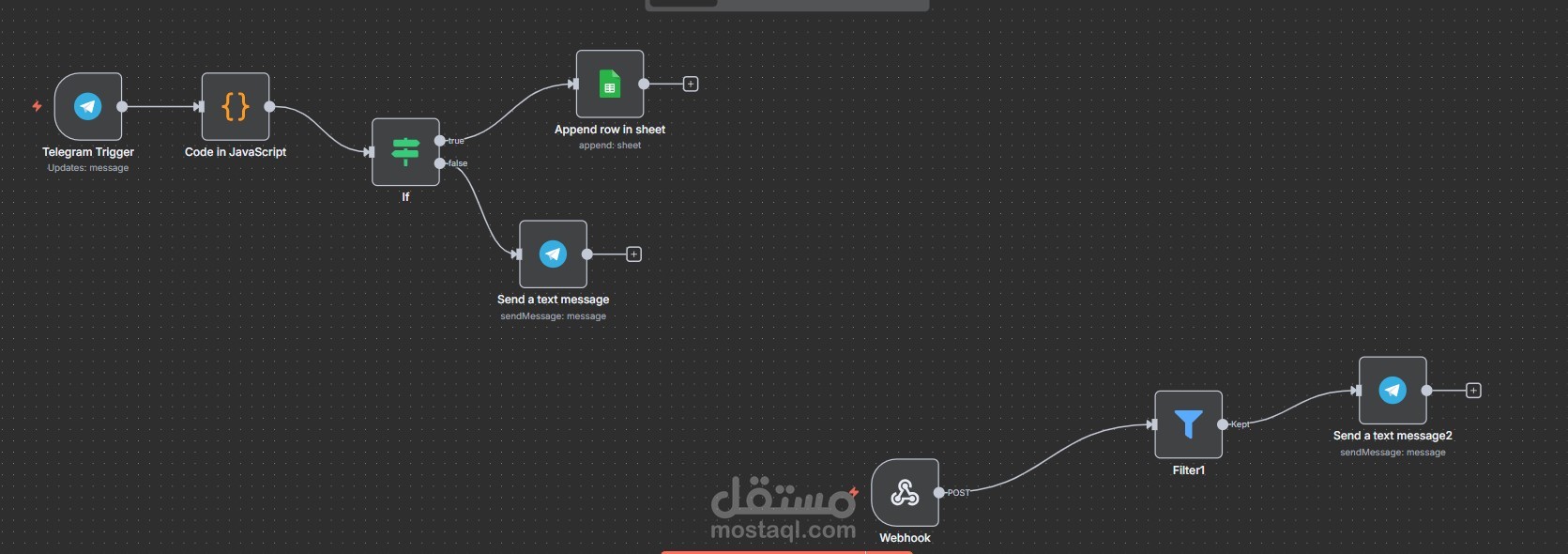
This workflow automates the student password reset process, creating a seamless bridge between user requests and the support team's actions. When a student submits their ID code, the system validates it and logs a "Need Reset" request in a shared Google Sheet. The support team then manually resets the password and updates the status to "Reset Done." This status change automatically triggers a final notification to the student, confirming a successful reset.
Detailed Step-by-Step Process ️
This workflow is divided into two key stages: Request Logging and Reset Confirmation.
Part 1: Request Initiation & Logging
Request Trigger: The process is initiated when a user submits a password reset request by providing their unique student code.
Code Validation: The workflow's first action is to validate the submitted student code against a database to ensure its authenticity.
Logging to Google Sheets: Upon successful validation, the automation adds a new row to a ded