(Share data between screens(betweener app
تفاصيل العمل
Betweener App
This application serves as a versatile platform allowing users to take full control of their links. Users are empowered to effortlessly add, edit, or remove their links based on their preferences. Sharing these links with others is equally seamless, enabling users to easily share Profiles.
At the core of this functionality lies the integration of APIs, which form the underlying infrastructure for data management. Through APIs, the application ensures efficient and secure storage of user-generated data. This encompasses the storage of added links, modifications, and removals, all seamlessly orchestrated through the API's capabilities.
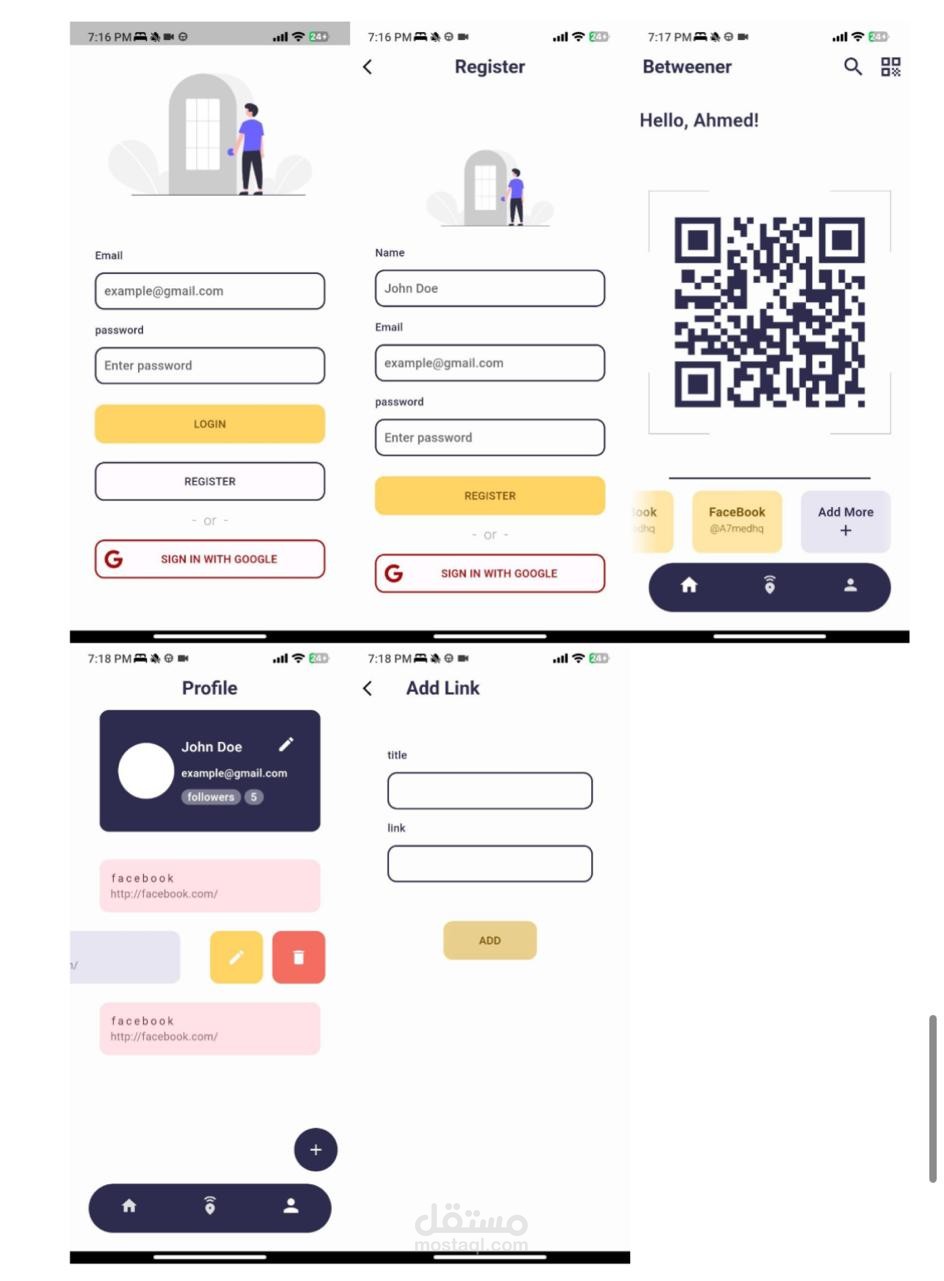
The application contains several pages, starting with the login page and creating an account, and then to the home page that contains the Qr Code and the links for the user, and at the bottom there are three icons arranged horizontally using the Row Widget, and when you click on the icon on the right, it will take us to the profile page So that the user name, email, the number of people who follow him, and the number of followers are displayed, and then the ListView.Builder is displayed in which the user’s links are displayed, and by dragging using the SlidableAction Widget, we can press the modification icon and go to the link modification page, and we can also delete it by clicking on the delete icon.
Also, through the modification icon at the top of the page, the profile can be modified.
And on the main page there is also an icon to search for users. This icon, when clicked, will take us to a search page, and when typing a username, all users will be displayed, and when clicking on any of them, the profile of the searched user will be displayed.
At every stage of the link management process, whether it involves adding, modifying, or performing lookups, the application seamlessly interacts with the API using various HTTP methods. These methods, such as GET, POST, PUT, and DELETE, enable the application to interact with API endpoints effectively.
When a link is added, the application uses the POST method to send the relevant data to the API, allowing the seamless inclusion of new links into the system. Similarly, for mods, the PUT method is used to update the necessary information associated with a specific link.
Moreover, the application makes use of the GET method when performing searches. This enables targeted information to be retrieved from API endpoints, allowing users to efficiently locate the data they are looking for.
In the world of testing and validation, Postman emerges as an invaluable tool. By simulating API interactions within a controlled environment, Postman verifies the functionality of the API endpoints. This extensive testing ensures that the API works as intended, promoting smooth and consistent communication between the application and the API