Backup-Data-server
تفاصيل العمل
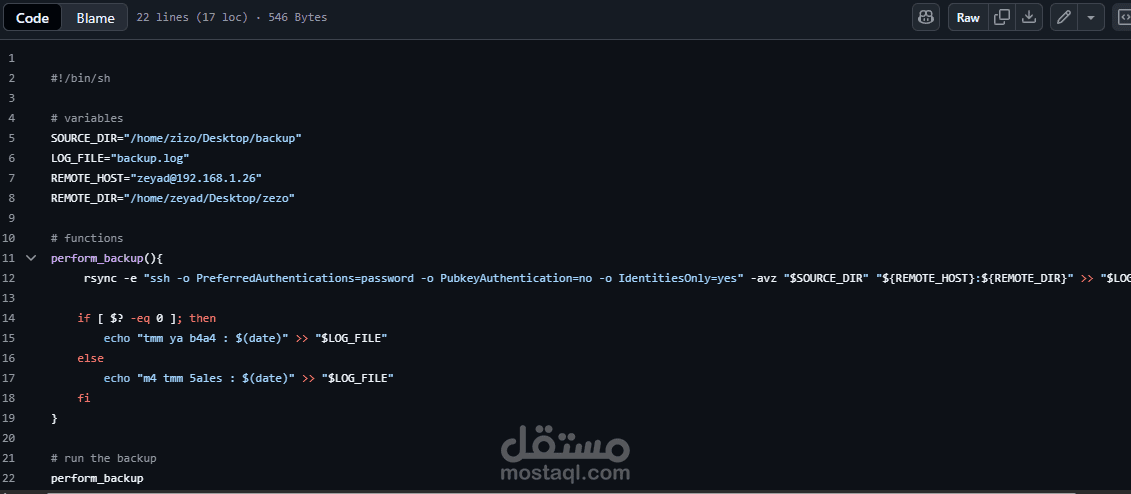
Weekly Auto Backup Script (Bash + Rsync + SSH)
This project is a simple Bash script that automates the backup of a file (data.txt) from a local Linux machine to a remote Linux machine every week using rsync over SSH. The operation is fully logged and can be scheduled using crontab.
Project Structure
backup.sh # The main script
backup.log # Output log file generated after each run
️ Features
Secure transfer via rsync over SSH
Logs all actions and errors to a log file
️ Automatically runs weekly via cron
Success & failure status messages with timestamps
? How It Works
The script backs up this file:
/home/zeyad/Desktop/bash/data.txt
It transfers it to this remote destination:
/home/zizo/Desktop/zeyad on machine 192.168.1.45
It uses rsync with SSH and logs every operation into backup.log.
Usage
Make the script executable:
chmod +x backup.sh
Run manually (for testing):
./backup.sh
Requirements
rsync installed on both local and remote machines
SSH access to the remote machine
Correct path to data.txt
SSH password authentication enabled
️ Public key authentication is disabled intentionally in this script:
-o PreferredAuthentications=password
-o PubkeyAuthentication=no
️ Setup Weekly Backup (Crontab)
To run the backup script automatically every week, use crontab:
crontab -e
Add this line to schedule the script every Monday at 12:00 PM:
0 12 * * 1 /home/zeyad/Desktop/bash/backup.sh
Now your backup will run weekly and log the results to backup.log.
Sample backup.log Output
----- Mon Jul 21 12:00:01 2025 -----
sending incremental file list
data.txt
sent 314 bytes received 35 bytes 698.00 bytes/sec
total size is 3.1K speedup is 9.09
Backup completed successfully at Mon Jul 21 12:00:03 2025
Author
Abdelaziz Hassan
Bash Projects | GitHub: [Abdel-3ziz]