monitoring-disk-cpu-mem-
تفاصيل العمل
️ System Resource Monitor Script (Bash)
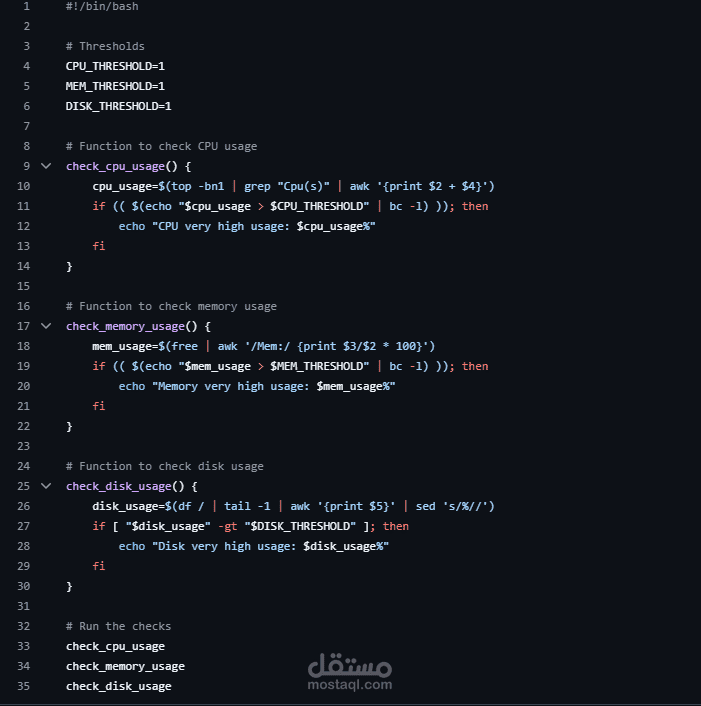
This is a lightweight Bash script that monitors CPU, Memory, and Disk usage on a Linux system. If any of the defined thresholds are exceeded, the script prints a warning to the terminal.
Project Structure
sys_monitor.sh # Main monitoring script
️ Features
? Checks current CPU usage
Checks RAM usage
Checks Disk usage
Prints a warning message if any usage exceeds defined thresholds
? How It Works
The script defines thresholds for:
CPU_THRESHOLD=1
DISK_THRESHOLD=1
MEMORY_THRESHOLD=1
Each resource is checked with a separate function:
CPU Monitoring
cpu_usage=$(top -bn1 | grep "Cpu(s)" | awk '{print $2 + $4}')
If current usage > threshold → prints:
High cpu usage : 32.5 %
? Memory Monitoring
mem_usage=$(free | grep "Mem" | awk '{print $3/$2 * 100.0}')
If current usage > threshold → prints:
High memory usage : 76.8 %
Disk Monitoring
disk_usage=$(df / | tail -1 | awk '{print $5}' | sed 's/%//')
If current usage > threshold → prints:
High disk usage : 89 %
Usage
Make the script executable:
chmod +x sys_monitor.sh
Run the script manually:
./sys_monitor.sh
️ This script is designed to run manually (not via cron). Useful for quick resource checks.
? Example Output
High cpu usage : 45.6 %
High memory usage : 83.2 %
High disk usage : 92 %
If system resources are below threshold → No output is shown.
️ Requirements
Linux system with:
top
free
df
awk, sed, grep, bc
These tools are available on most Linux distros by default.
Author
Abdelaziz Hassan
System Monitoring Tools | GitHub: [Abdel-3ziz]